
5G Compatibility Check: Is Your Phone Actually 5G Ready?

Your phone supports 5G if three things are true at once: the hardware has a 5G modem with the right bands, your carrier activates 5G on your account, and your SIM is provisioned for it. Miss any one of those, and you’ll stay on LTE no matter what the box says.
Run these three checks right now:
- Settings screen: Go to your network settings and look for a 5G option. If it’s there, the hardware qualifies.
- Model number and spec sheet: Find your exact model/SKU, pull the manufacturer’s spec page, and confirm it lists 5G NR bands.
- Carrier and plan: Call or log into your carrier account to verify your plan includes 5G and your SIM is provisioned for it.
One thing worth knowing upfront: a “5G” label on the box doesn’t guarantee full performance. Phones that support only Sub-6 GHz bands (FR1) get broader coverage but lower peak speeds, while mmWave (FR2) phones hit ultra-fast speeds in a much smaller area. Many phones skip mmWave entirely, so the 5G NR band list on your spec sheet tells the real story.
Key Takeaways
A phone is only truly 5G ready when the hardware, the carrier plan, and the SIM provisioning all align — checking just one of those three will give you an incomplete answer.
| Point | Details |
|---|---|
| Settings screen check | Look for a 5G option under Cellular Data Options (iPhone) or Preferred Network Type (Android). |
| Model number and spec sheet | Find your exact SKU and confirm 5G NR bands on the manufacturer’s spec page before assuming compatibility. |
| Carrier and plan verification | Confirm your plan includes 5G and your SIM is provisioned — hardware alone is not enough. |
| Band type matters | FR1 (Sub-6 GHz) gives broad coverage; FR2 (mmWave) gives peak speed over short range — most phones support FR1 only. |
| Devicegiant verified option | Devicegiant’s refurbished 5G phones include a 25-point inspection and 90-day returns, with band specs listed per device. |
Table of Contents
- How to do a 5G compatibility check on your iPhone
- How to check for 5G in Android settings
- How to find and verify your exact model number and 5G bands
- How to check carrier support, plan, SIM provisioning, and coverage
- Apps and online tools to check 5G compatibility and supported bands
- Why your phone might not show 5G even when it supports it
- What are the 5G frequency types and why do they matter?
- What to do if your phone isn’t 5G capable
- Verified 5G phones from Devicegiant
- Sources
How to do a 5G compatibility check on your iPhone
Apple’s support page makes this straightforward: open Settings > Cellular > Cellular Data Options (or Mobile Data > Mobile Data Options depending on your region). If a 5G option appears there, your iPhone has 5G hardware. If you only see 2G, 3G, or LTE, the device doesn’t support 5G.
Steps:
- Open Settings.
- Tap Cellular (or Mobile Data).
- Tap Cellular Data Options (or Mobile Data Options).
- Look for Voice & Data — if 5G, 5G Auto, or 5G On appear, you’re set.
- Check the status bar for a 5G icon when you’re in a covered area.
If 5G doesn’t show up in that menu:
- Update iOS: go to Settings > General > Software Update.
- Toggle Airplane Mode off and on to force a network re-registration.
- Turn off Low Power Mode — it can suppress 5G automatically.
- Confirm with your carrier that your plan and SIM are 5G-enabled.
Pro Tip: If you use Dual SIM or eSIM, 5G may only be available on one line at a time depending on your iOS version and carrier. Apple began supporting 5G on both lines simultaneously starting with iOS 16.4 on certain carriers — check your carrier’s specific Dual SIM 5G policy before assuming both lines get 5G.
How to check for 5G in Android settings
On most Android phones, the path is Settings > Network & Internet > Mobile network > Preferred network type. Samsung devices often use Settings > Connections > Mobile networks > Network mode. If 5G appears as an option in that dropdown, the hardware supports it.
Steps:
- Open Settings.
- Tap Network & Internet (or Connections on Samsung).
- Tap Mobile network (or Mobile networks).
- Tap Preferred network type (or Network mode).
- Check whether 5G/LTE or 5G Auto appears as a selectable option.
On Pixel phones, the Pixel 4a (5G) and later models support 5G, but not every carrier activates every Pixel’s 5G bands. A 5G icon in the status bar confirms you’re connected, but it doesn’t guarantee peak speeds.
Carrier-branded Android models sometimes run regional firmware that hides 5G settings even when the hardware supports it. If you bought a phone abroad or through a third-party seller, that’s worth checking.
- OnePlus, Xiaomi, and other OEM skins may label the menu differently — search “network” in the Settings search bar if you can’t find it.
- Carrier apps (like T-Mobile’s app) sometimes show your network type more clearly than the Settings menu.
Pro Tip: Battery Saver and Ultra Power Saving modes on Android actively disable 5G to extend battery life. If 5G disappears suddenly, check your power mode before assuming a network or SIM problem.
How to find and verify your exact model number and 5G bands
Marketing names lie. The “Galaxy S23” sold in the US and the version sold in Europe can have completely different modem chips and band sets. Only the exact model number or SKU, matched against the manufacturer’s spec sheet, tells you which 5G NR bands your specific device actually supports.
Steps:
- On Android: go to Settings > About phone > Model number. On iPhone: go to Settings > General > About > Model Number (tap it once to see the full model identifier).
- Check the device label under the battery or on the original packaging for the SKU.
- Search the manufacturer’s website for that exact model number and open the full tech specs page.
- Find the section labeled 5G NR bands or look for band numbers starting with “n” (n41, n77, n78, etc.).
- Compare those bands against your carrier’s published band list to confirm overlap.
The band-match rule: your phone needs at least one primary coverage band that your carrier uses heavily, plus VoLTE support on the right LTE band. A phone missing the carrier’s primary 5G band will fall back to LTE even in areas with strong 5G coverage. Missing the VoLTE band can break voice calls entirely, even when data works fine.
For example, a phone labeled “Motorola Edge 5G” might be sold as model XT2063-3 in the US and XT2063-2 in Europe. The US version may include n71 (T-Mobile’s low-band 5G), while the European version does not. Same name, different phone.
How to check carrier support, plan, SIM provisioning, and coverage
Hardware is only half the equation. A 5G-capable phone still needs a carrier that supports 5G for that specific model, a plan that includes 5G access, and a SIM or eSIM provisioned to activate it.
Carrier-side checklist:
- Carrier device compatibility page: Most major carriers (T-Mobile, Verizon, AT&T) have an online tool where you enter your IMEI or model number to confirm 5G support.
- Plan check: Log into your account or call your carrier to confirm your current plan includes 5G. Some older unlimited plans don’t, even if your phone supports it.
- SIM provisioning: A standard LTE SIM may need to be replaced or re-provisioned for 5G. eSIM activation sometimes requires a carrier-specific profile update.
- Carrier-approved device list: Some carriers only activate 5G on devices they’ve certified. An unlocked phone bought elsewhere may not appear on that list.
- Coverage map: Even with all the above confirmed, 5G only works where the carrier has deployed it. Check your carrier’s coverage map for your specific address.
Pro Tip: If you recently switched carriers or ported your number, your SIM provisioning may not have fully updated. Removing and reinserting the SIM, or requesting a new SIM from the carrier, often resolves 5G that refuses to activate despite everything else checking out.
Apps and online tools to check 5G compatibility and supported bands
The fastest tools for a 5G support check are the ones that don’t require installing anything:
- Manufacturer spec pages (Apple, Samsung, Google, Motorola): search your exact model number plus “specs” and look for the 5G NR bands section. These are the most reliable source.
- Carrier compatibility checkers: T-Mobile, Verizon, and AT&T all offer IMEI or model-number lookup tools on their websites that confirm whether your device is approved for 5G on their network.
- GSMArena.com: A well-known spec lookup site that lists 5G NR bands for thousands of models. Enter your exact model name and check the “Network” section.
- 5G Checker apps (Google Play): Apps like “5G Checker” display your current network type, connected bands, and SIM details in real time. Useful for confirming live 5G connectivity, but some request broad device permissions — stick to apps with strong review histories and avoid granting location or contact access they don’t need.
When using any tool, enter your exact model number, not the commercial name. The output you’re looking for is a list of supported 5G NR bands (n-numbers). Compare those against your carrier’s band list to confirm real-world compatibility.
Why your phone might not show 5G even when it supports it
Missing 5G is almost always one of five things: a software issue, a power mode suppressing it, a SIM that isn’t provisioned, a band mismatch, or simply no coverage at your location. Work through these in order.
- Check Settings first — confirm the Preferred Network Type is set to 5G, not LTE-only.
- Update your software — go to Settings > Software Update (Android) or Settings > General > Software Update (iPhone). Carrier settings updates matter too; on iPhone, a carrier update prompt sometimes appears separately.
- Reboot the phone — a full restart clears network registration errors that can lock a device onto LTE.
- Disable Low Power Mode or Battery Saver — both platforms suppress 5G automatically when these modes are active.
- Test with a different SIM — if a friend’s 5G SIM shows 5G on your phone, your original SIM isn’t provisioned correctly.
- Confirm band overlap — use the model-number and spec-sheet method above to verify your phone’s bands match your carrier’s deployed 5G bands.
- Contact your carrier — if everything else checks out, the carrier may need to push a provisioning update or replace your SIM.
Common quick fixes:
- Toggle Airplane Mode off and on to force network re-registration.
- Reset network settings (this clears saved Wi-Fi passwords, so note those first).
- Check the carrier’s outage map for your area.
What are the 5G frequency types and why do they matter?
5G NR defines two main frequency ranges: FR1 (Sub-6 GHz, roughly 410 MHz to 7,125 MHz) and FR2 (mmWave, roughly 24.25 GHz to 71.0 GHz). A third range, FR3, covering mid-band frequencies above 7 GHz, is under active standardization but not yet widely deployed.
| Frequency Range | Bands | Coverage | Peak Speed |
|---|---|---|---|
| FR1 (Sub-6 GHz) | 410 MHz – 7,125 MHz | Wide area, good building penetration | Moderate to high |
| FR2 (mmWave) | 24.25 GHz – 71.0 GHz | Short range, line-of-sight | Very high |
| FR3 (proposed) | 7 GHz – 24 GHz | Mid-range, in development | High |
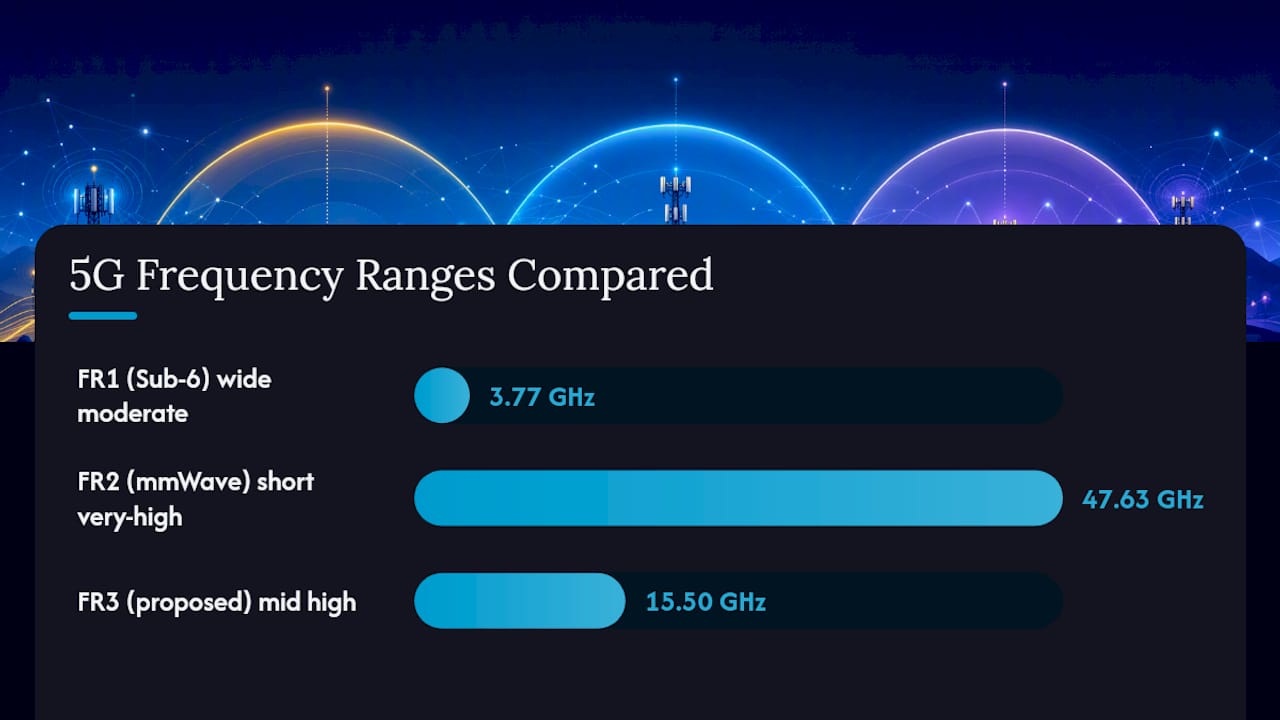
Most phones sold today support FR1 only. mmWave (FR2) support is limited to higher-end models and specific regional variants, and even then, mmWave coverage is concentrated in dense urban areas, stadiums, and airports. A phone missing mmWave won’t hit the headline speeds carriers advertise, but it will still get usable 5G coverage across a much wider area.
Band n78 (3.5 GHz, FR1) is one of the most widely deployed 5G bands globally. If your phone lists n78, it’s likely to connect to 5G in most markets that have launched the network.
What to do if your phone isn’t 5G capable
If the spec sheet confirms your phone lacks 5G NR bands entirely, you have a few practical paths:
- Update firmware: Some older phones received 5G activation through software updates — check for any pending updates before assuming the hardware is the limit.
- Request carrier provisioning: If your phone is listed as 5G-capable by the carrier but 5G isn’t working, a provisioning update from the carrier may be all you need.
- Swap to a 5G SIM: An older SIM card may not support 5G network slicing. Ask your carrier for a replacement.
- Buy a verified 5G phone: If the hardware simply doesn’t have a 5G modem, no update will change that.
- Sell or trade in your current device: Many carriers and resellers offer trade-in credit toward a 5G upgrade.
Buying checklist for a verified 5G phone:
- Confirm the exact model number and SKU before purchasing.
- Check the manufacturer’s spec sheet for 5G NR bands and match them to your carrier’s band list.
- Verify the phone is unlocked or carrier-compatible with your specific network.
- Confirm a return policy or warranty of at least 30 days.
- Ask whether the device has been tested for 5G connectivity, not just listed as 5G-capable.
A refurbished 5G midrange phone that’s been properly inspected and band-verified often costs a fraction of a new device while delivering the same network access.
A note on buying refurbished 5G phones
Buying a refurbished 5G phone is lower-risk than most people assume, as long as you verify the right things. At Devicegiant, every device goes through a 25-point TrueGrade inspection that covers hardware functionality, not just cosmetics. The cosmetic grade (A through D) is disclosed upfront, so you know exactly what you’re getting. The 90-day return policy means you have real time to confirm 5G works on your carrier before you’re committed. What to confirm before buying any used 5G phone: the exact model/SKU, which 5G NR bands are listed in the spec sheet, whether the device is unlocked or locked to a specific carrier, and whether the seller has actually tested the radio hardware.
Verified 5G phones from Devicegiant
Knowing your phone needs a 5G upgrade is one thing. Finding a verified one at a price that makes sense is another. Devicegiant carries refurbished 5G phones that have passed a 25-point TrueGrade inspection, with cosmetic grading disclosed so there are no surprises.

Every device comes with a 90-day return policy and options for both unlocked and carrier-specific configurations. Whether you want a budget entry point like the OnePlus 8 5G from $76 or a higher-tier option like the OnePlus 12R 5G from $265, the band specs and inspection history are part of the listing. Browse the full verified 5G inventory at Devicegiant and filter by the model that matches your carrier’s band requirements.
Sources
- Use 5G with your iPhone - Apple Support
- Connect to mobile networks on a Pixel phone - Pixel Phone Help
- Frequency Bands and Device Compatibility — How to Verify Before You Buy | SimFinder
- 5G Bands Explained for Carrier Compatibility


