
Buying Refurbished Electronics Online Without Getting Burned

The best route for refurbished electronics is buying from a certified refurbisher with a documented inspection process, an OEM or grade-disclosed parts policy, and a return window of about three months or longer. Device Giant fits that standard: every phone passes a documented multi-point inspection before listing, backed by a return policy generally lasting several months. The rest of this guide covers the seller categories worth trusting, how to vet any listing, and a checklist to run before and after you buy.
TL;DR:
- Choose refurbish sellers that provide a warranty of at least three months and a documented, multi-point inspection process to ensure device quality.
- Verify device safety by checking IMEI status, carrier lock, and battery health, especially on phones, before completing the purchase.
- Retailers like Apple or Samsung offer factory-grade refurbishment with OEM parts and a full-year warranty, while third-party marketplaces require careful scrutiny of their grading and return policies.
- Savings vary based on device type and grade, but generally range from 20% to 60% below new retail prices, with higher-grade devices and longer warranties costing more.
- Look for certifications like R2 or ISO 14001 as signs of environmental standards, but prioritize actual seller practices such as repair, trade-in policies, and warranty length for sustainability assurances.
Table of Contents
- Best Refurbished Electronics Websites and Where They Fit
- How to Evaluate a Refurbished Seller Before You Buy
- What to Expect on Price and Savings
- The Environmental Case for Buying Refurbished
- Your Step-by-Step Refurbished Buying Checklist
- How Device Giant Applies These Standards
- Ready to Shop With Confidence?
- Sources
Best Refurbished Electronics Websites and Where They Fit
Not every refurbished seller operates the same way, and the differences matter more than most shoppers realize. Where you buy determines how the device was tested, who stands behind the warranty, and how much recourse you have if something fails in month two.
Manufacturer-certified stores sit at the top for reliability. Apple, Samsung, and Dell all run their own refurbishment programs, restoring devices with OEM parts and offering warranties that can stretch a full year. You pay more than you would elsewhere, but you get factory-level quality control and a warranty that matches new-device coverage in length, if not always in scope. Pick this route when you want the lowest possible risk and don’t mind paying closer to retail.
Big retailers and carriers occupy the middle ground. Amazon Renewed, Best Buy, and major carriers sell refurbished phones and laptops through their existing storefronts, which means familiar checkout, familiar return policies, and often a 90-day warranty baked into the purchase. The tradeoff is inconsistency: the actual refurbishing work is frequently outsourced to third-party vendors, so quality can vary between two listings on the same page even though the storefront looks identical.
Dedicated refurbished electronics marketplaces are where most price-sensitive buyers land, and for good reason. These sites specialize in one thing, which means grading systems, inspection checklists, and warranty terms tend to be more transparent than what you find bolted onto a general retailer’s site. Selection is usually broader too. Look for:
- A clearly published grading scale (A through D, or similar) with photos or descriptions of what each grade actually looks like
- A warranty period stated in days, not vague language like “limited coverage”
- A returns page you can read before you buy, not one buried in a support ticket queue
- Contact information for a real support team, not just a chatbot
That savings comes with real exposure. You’re relying entirely on one person’s honesty about condition, battery health, and whether the phone is even unlocked. Before buying peer-to-peer, check the IMEI or serial number against a blacklist database, review the seller’s feedback history and how long they’ve been active, and confirm the platform offers buyer protection if the item doesn’t match the listing.
There’s no single legal definition of “refurbished” governing any of these channels, which is exactly why the seller matters more than the label. WIRED’s buying guide makes the same point: quality and testing standards vary widely from one seller to the next, so the strength of the warranty and the transparency of the inspection process tell you more than the word “refurbished” ever will.
How to Evaluate a Refurbished Seller Before You Buy
Every refurbished electronics website looks trustworthy on the surface. The differences show up when you dig into the specifics, and there’s a logical order to checking them.
- Warranty length and coverage. This is the single strongest signal of seller confidence. A a warranty lasting about three months or longer typically indicates a more rigorous refurbishing process, while sellers offering a shorter warranty often rely on cheaper inventory or skip verification steps. Read what the warranty actually covers, not just how long it lasts. A warranty that only covers “manufacturing defects” is weaker than one covering battery performance and screen function too.
- Return window and restocking fees. A generous warranty means little if the return policy has hidden costs. Check for restocking fees, who pays return shipping, and whether the window starts at order date or delivery date.
- Inspection standards. Ask who actually performed the refurbishment and whether there’s a documented, multi-point checklist behind it. Professional refurbishers test battery health, display calibration, connectivity, and storage integrity, and they keep records that support warranty claims later. A seller who can’t describe their inspection process in specific terms probably doesn’t have one.
- Parts provenance. OEM parts cost more but perform more predictably than aftermarket substitutes, especially for screens and batteries. A trustworthy listing will disclose which parts were replaced and with what.
- IMEI, serial, and carrier lock checks. For phones especially, verify the device isn’t blacklisted and confirm carrier compatibility before you pay. This single step avoids the most common post-purchase disaster: a phone that looks perfect but won’t activate.
- Secure data-wiping practices. Ask whether the seller certifies data deletion on devices they’ve refurbished, and whether they wipe your data securely when you trade one in.
- Payment protections. Use a credit card or a platform with buyer protection, and screenshot the listing before you complete the purchase. If a dispute comes up later, you’ll want proof of exactly what was promised.
Pro Tip: Save a screenshot of the listing, the seller’s warranty terms, and the order confirmation the moment you buy. If a device shows up with a battery health lower than what the listing claimed, that documentation is what turns a frustrating email exchange into a fast resolution.
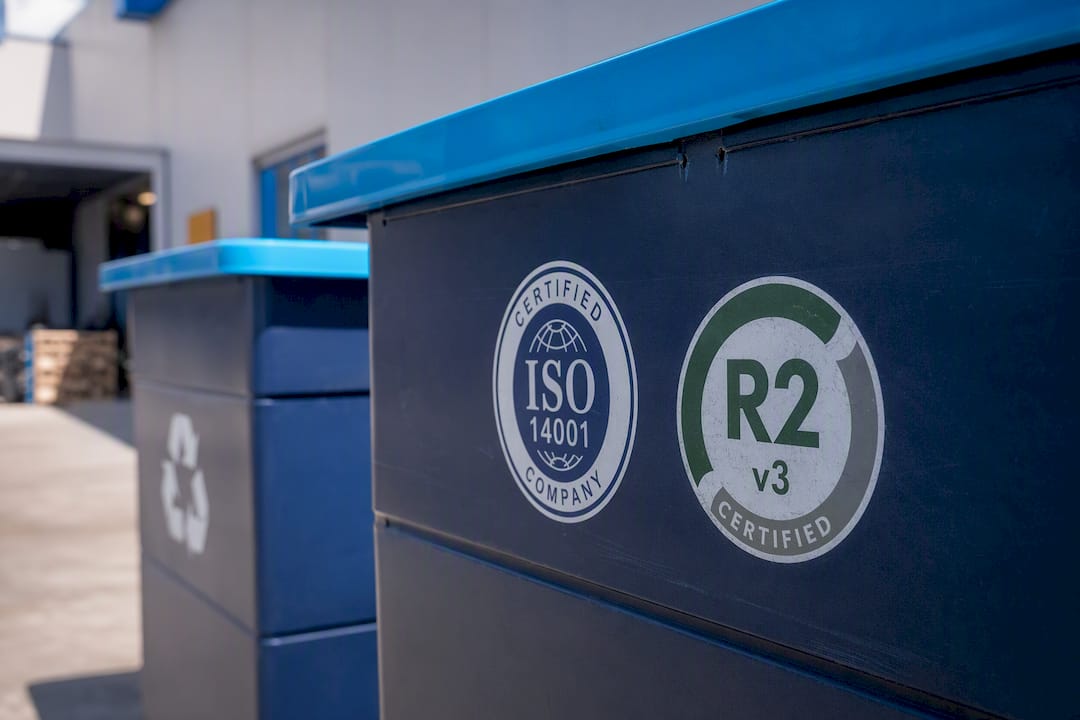
Look, too, for certifications like ISO 14001 or R2 (Responsible Recycling), which signal that a refurbisher follows structured environmental and quality processes rather than ad hoc handling. None of these steps take more than a few minutes each, but skipping them is how buyers end up with a bricked phone and no recourse.
What to Expect on Price and Savings
Refurbished pricing swings widely depending on device category, grade, and warranty length, and understanding the pattern helps you spot a genuinely good deal versus a red flag.
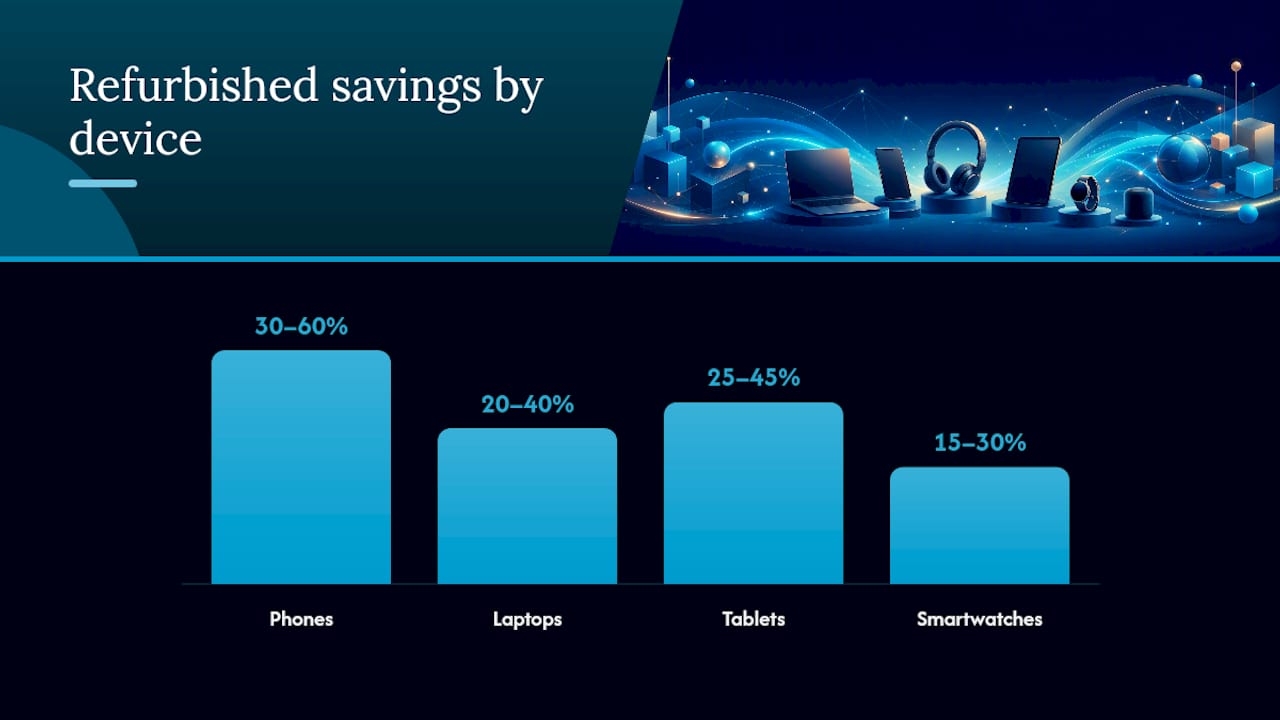
- Phones typically run 30 to 60% below new retail price, with the gap widening for devices one or two generations old.
- Laptops often save 20 to 40%, though savings shrink for high-demand configurations like Apple’s M-series machines.
- Tablets tend to land in the 25 to 45% range, depending on storage tier and screen condition.
- Smartwatches save less proportionally, often 15 to 30%, since battery degradation affects resale value more sharply.
Grade and warranty length explain most of the price spread within a single model. A grade A phone with a 90-day warranty will cost more than a grade C unit with a 14-day window, and that gap reflects real risk, not just cosmetics. If a listing’s price seems dramatically lower than every comparable one you’ve seen, treat that as a warning sign rather than a lucky find. Check whether the warranty is unusually short, whether the seller discloses battery health at all, and whether reviews mention activation problems.
The smarter comparison isn’t sticker price. It’s effective cost, meaning the purchase price plus the realistic odds of a repair bill if the warranty is thin. A $220 phone with a 14-day warranty can end up costing more than a $260 phone backed 90 days, once you factor in how repair costs affect real device value over the life of the device.
The Environmental Case for Buying Refurbished
Every refurbished phone or laptop you buy instead of a new one is one less device pulled from raw mineral extraction and one less unit added to the growing pile of electronic waste. The manufacturing phase accounts for the majority of a smartphone’s lifetime carbon footprint, so extending a device’s usable life through refurbishment cuts emissions more than any recycling program applied after the fact.
The certification landscape here is still developing, which makes it worth knowing what to actually look for:
- EPEAT Renew, a proposal from the Global Electronics Council, aims to independently verify refurbished devices against criteria including a minimum one-year quality guarantee and secure data deletion.
- R2 (Responsible Recycling) certification signals that a refurbisher handles end-of-life electronics and data security to an audited standard.
- ISO 14001 covers environmental management systems, a useful signal for larger refurbishing operations.
Ecolabel pilots like EPEAT Renew are still early-stage, so adoption across the industry remains limited for now. That means the most reliable environmental signal available to you today isn’t a certification logo. It’s a seller’s actual practices: does the company offer take-back or trade-in programs, guarantee repairs rather than replacements when possible, and back devices with at least a one-year warranty on refurbished laptops where that pilot standard applies? Those operational choices tell you more about a seller’s genuine sustainability commitment than any badge on the homepage.
Your Step-by-Step Refurbished Buying Checklist
Running through this sequence takes maybe ten minutes and eliminates most of the ways a refurbished purchase goes wrong.
Before you buy:
- Confirm the warranty length and exactly what it covers.
- Read the return policy in full, including who pays shipping and whether restocking fees apply.
- For phones, ask the seller for the IMEI and run it through a blacklist check before paying.
- Ask the seller to describe their inspection checklist. A vague answer is itself useful information.
During the purchase: 5. Pay with a credit card or a platform offering buyer protection, never a direct bank transfer to an unknown seller. 6. Screenshot the listing, the price, the warranty terms, and your order confirmation.
The first 72 hours after delivery: 7. Power on the device immediately and confirm activation works on your carrier. 8. Test every core function: cameras, speakers, charging port, buttons, screen touch response, and Wi-Fi/Bluetooth. 9. Check battery health through the device settings if the operating system exposes it. 10. Photograph any cosmetic issue or malfunction the same day you notice it. 11. If something’s wrong, open a return or warranty claim immediately. Warranty windows don’t pause for procrastination.
Keep every photo, screenshot, and email in one folder. If you ever need to file a warranty claim, having a clean paper trail from delivery day forward is what turns a slow support ticket into a same-week resolution. For a deeper breakdown of how refurbished terminology differs across sellers, Device Giant’s guide to refurbished, renewed, and used phones walks through the label differences that trip up a lot of first-time buyers.
How Device Giant Applies These Standards
Every phone that reaches Device Giant’s inventory goes through the TrueGrade inspection, a 25-point functional checklist covering battery health, display performance, connectivity, ports, buttons, and cosmetic grading before it’s ever listed for sale.
None of that happens by accident. Pricing a phone fairly, testing it thoroughly, and standing behind it for three months are three different commitments, and most sellers compromise on at least one to protect margin. Device Giant’s approach is to hold the line on inspection rigor while still hitting the price point that makes refurbished worth choosing over new, which is the entire reason eco-conscious and budget-conscious buyers land on refurbished electronics in the first place.
— Saad
Ready to Shop With Confidence?
You now have the framework: check the warranty, verify the inspection process, confirm parts provenance, and run an IMEI check before you commit. Device Giant checks every one of those boxes without asking you to pay full retail for the privilege. Every phone in inventory has already passed the TrueGrade 25-point inspection, carries a 90-day return window, and comes with cosmetic grading disclosed upfront on the product page, so you know exactly what condition you’re buying before checkout.

Savings can be substantial compared to new pricing, varying by model and grade, and every listing shows battery health and cosmetic condition before you add it to your cart. If you’re upgrading a personal phone, browse the current lineup starting with the Samsung Galaxy A54 5G or the compact Motorola Razr 50 if a foldable fits your budget better. Not sure refurbished is the right call for your situation? Read Device Giant’s breakdown of whether refurbished phones are worth it first, then head to the full inventory and filter by grade and price to find your match.
Sources
A few resources are worth keeping on hand as you shop, beyond any single seller’s claims. Consumer Reports publishes ongoing guidance on what separates a trustworthy refurbished purchase from a risky one, with practical advice on warranty length and return terms. WIRED’s refurbished buying guide covers the terminology confusion that trips up most first-time buyers. The Global Electronics Council, through its EPEAT Renew proposal, is the group to watch for emerging sustainability standards in refurbished electronics. And GSMA, through its device-check service, backs the IMEI verification tools that catch blacklisted phones before they cost you money.
- How to Buy Used or Refurbished Electronics - WIRED
- What’s the Difference Between New, Used, and Refurbished? - iFixit
- Should You Buy Refurbished Electronics? - Consumer Reports
- RENEW™ Product Category Proposal & State of Sustainability Research - GEC (EPEAT Renew)
- GSMA device check powers CTIA stolen device checker service - GSMA


