
iCloud Locked vs. Unlocked: What Buyers and Sellers Must Know

An iCloud-locked device is tied to someone else’s Apple ID through Activation Lock, and it cannot be set up by a new owner until that account is removed or Apple verifies ownership. An unlocked device has no such tie: it powers on to the “Hello” setup screen and accepts any Apple ID. That single difference decides whether a used iPhone or iPad is worth buying at all.
If you’re comparing an iCloud locked vs unlocked listing right now, the rule is simple:
- Never pay for a locked device unless the seller removes the lock in front of you or provides documented proof Apple will accept.
- Sellers should erase and unlink devices before listing them, every time.
- Unlocked, verified devices carry real resale value; locked ones are often worth little beyond parts.
Key Takeaways
An iCloud-locked device cannot be activated by anyone but the original Apple ID holder or Apple Support acting on verified proof of purchase, which makes verification the single most important step before any used-device purchase.
| Point | Details |
|---|---|
| Locked means unusable | Activation Lock blocks setup, iCloud, iMessage, and Apple Pay until the original account is removed. |
| Resets don’t help | Erasing or restoring a device does not clear Activation Lock because the check runs on Apple’s servers. |
| Verify before paying | Watch the seller erase the device and remove it from Find My in real time, not after the sale. |
| Only two removal paths exist | The previous owner unlinks it, or Apple Support approves removal with matching purchase documentation. |
| Skip bypass services entirely | No third-party tool can override server-side Activation Lock; treat any claim otherwise as a scam. |
| Buy pre-verified when possible | Devicegiant’s TrueGrade inspection confirms Activation Lock removal before a device is ever listed. |
Table of Contents
- What Is iCloud Locked Vs Unlocked, Really?
- What Can a Locked Phone Actually Do?
- How Do You Check If a Phone Is iCloud Locked?
- Does Activation Lock Affect What You Can Buy or Sell?
- What Are the Official Ways to Remove Activation Lock?
- Why Are Third-Party iCloud Unlock Services Unsafe?
- Why Verified Refurbished Sourcing Solves the iCloud Lock Problem
- Trusted Sources for Activation Lock Questions
- The Real Lesson Buried in Activation Lock Complaints
- Buy a Phone You Know Is Clean From Day One
What Is iCloud Locked Vs Unlocked, Really?
Activation Lock is the feature behind the term “iCloud locked.” It switches on automatically the moment Find My is enabled on an iPhone, iPad, or Apple Watch, and it links the device’s hardware identity to the owner’s Apple ID on Apple’s own servers, not just to something stored locally on the phone. That’s the detail most people miss.
Because the check happens server-side, a factory reset does nothing to clear it. Erase the device, restore it, even swap the logic board, and it will still contact Apple’s activation servers during setup and ask for the original owner’s credentials. A locked phone bought off a resale site is functionally a paperweight until that account is disconnected.
The design is deliberate. Apple built Activation Lock as theft deterrence: if stolen phones are worthless without the owner’s password, stealing them loses its appeal. It’s also why no master override exists — not for Apple Support, not for a repair shop, not for anyone without the account credentials or approved documentation.
A few quick distinctions that trip people up:
- Carrier lock restricts which SIM cards work in a phone and has nothing to do with Activation Lock. The FCC’s guidance on unlocking wireless phones covers that process separately.
- Passcode lock is a screen lock the current user sets and can remove themselves; Activation Lock requires the Apple ID owner specifically.
- Managed devices (school or corporate) sometimes use escrowed bypass codes through device management systems, but that option doesn’t extend to devices sold on the consumer market.
Apple’s own guidance states plainly that removing a device from Find Devices on iCloud.com erases everything on it first. There’s no partial unlock, no way to keep data and shed the lock at the same time.
What Can a Locked Phone Actually Do?
Here’s where theory turns into a real problem for anyone holding a locked device.
- Setup stops cold. The phone displays the Activation Lock screen asking for the previous owner’s Apple ID and password. Skip that step and it’s not possible to move forward.
- Core services stay dark. iCloud, iMessage, FaceTime, and Apple Pay won’t activate. You also lose the ability to restore any backup tied to that Apple ID, so even if you somehow get past setup, your data history is gone.
- App Store and cellular activation get blocked too, depending on carrier and iOS version, which means the device is often unusable even as a Wi-Fi-only tablet.
- Resale value collapses. Reputable buyers, marketplaces, and refurbishers won’t touch a locked unit because there’s no way to guarantee it will ever unlock.
- Parts and recycling remain an option. A locked iPhone still has a working screen, camera module, and battery that repair shops can harvest, so it isn’t total waste. That’s the honest ceiling on its value, though: parts money, not resale money.
It’s worth separating this from carrier unlocking, which is a completely different axis. A phone can be both carrier-unlocked (works on any network) and iCloud-locked (unusable to anyone but the original account holder) at the same time. Sellers sometimes advertise “unlocked” meaning only the carrier status, which is technically true and completely misleading if the Activation Lock is still active.
How Do You Check If a Phone Is iCloud Locked?
Before money changes hands, run through this sequence. It takes ten minutes and it’s the difference between a good deal and a $400 mistake.
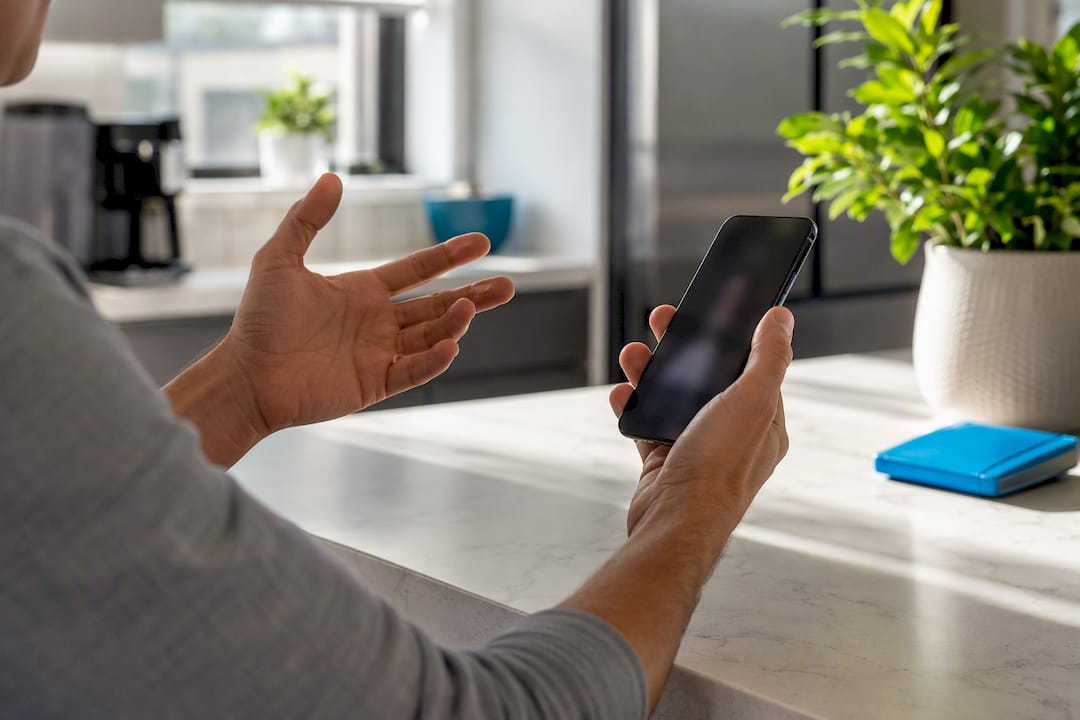
- Ask the seller to fully erase the device and hand it to you powered off. Turn it on yourself and confirm you see the “Hello” setup screen, not an Apple ID login prompt.
- Watch the seller remove the device from iCloud.com/find or sign out of iCloud on the device itself, in real time, ideally over video call for remote purchases. This step matters more than any visual inspection.
- Run an IMEI or serial number check as a supplementary step, not a primary one. These tools can flag a device reported lost or stolen but don’t reliably confirm Activation Lock status on their own.
- Treat refusal as a hard stop. If a seller won’t erase the phone, won’t remove it from Find My in front of you, or gets vague about “sorting it out after payment,” walk away. There’s no legitimate reason to skip this.
For a fuller rundown of the visual cues and settings screens that confirm a device is genuinely ready for a new owner, this guide on telling if a phone is unlocked walks through it screen by screen.
Pro Tip: Ask the seller to erase the device with you watching over video chat, then power it on live. A recorded video from before the sale proves nothing, since Activation Lock can be re-enabled after the fact.
Does Activation Lock Affect What You Can Buy or Sell?
Resale value tells the real story here. A verified unlocked iPhone 13 in good condition holds a predictable market price. The same model, iCloud-locked, is often listed for a fraction of that, and even at a steep discount, most experienced buyers pass on it entirely because there’s no guarantee it ever unlocks. Reputable resellers and refurbishers build their entire pricing model around devices they can confirm are clean.
If you’re selling, the fix is straightforward and should happen before you ever list the phone:
- Back up your data, then fully erase the device through Settings, not just a quick wipe.
- Sign out of iCloud and remove the device from your Apple ID’s device list.
- Keep your original receipt or order confirmation. If a buyer ever has a dispute, or if you need to prove ownership later, that paperwork is your only leverage.
For buyers, favor marketplaces with actual buyer protection built in: PayPal Goods and Services, eBay’s money-back guarantee, or a platform with an escrow-style hold period, rather than cash apps or wire transfers with zero recourse. Private local sales through classified sites carry the highest risk because there’s usually no path to a refund once the money moves.
If you’ve inherited or ended up with a device that’s genuinely locked and unrecoverable, the honest options are limited: sell it explicitly as parts or “for repair only” at a heavily discounted price, or recycle it through an electronics recycling program. Don’t list it as a working phone. That’s how the scam economy around locked devices keeps going.
What Are the Official Ways to Remove Activation Lock?
There are exactly two legitimate paths, and no third option, no matter what a seller on a forum claims.
- The previous owner removes it. They sign into iCloud.com/find or the Find My app, select the device, and erase it, which strips the Apple ID association. If they’re standing next to the phone, they can also just sign out of iCloud in Settings.
- Apple Support removes it after reviewing proof of purchase. This requires the original sales receipt showing the device’s serial number or IMEI, the retailer name, and the purchase date, matched against Apple’s own records.
Apple will not remove Activation Lock without that documentation, and it will not remove it at all if the device has been reported lost or stolen, regardless of what paperwork you present. There’s no support-line workaround, no supervisor escalation that bypasses this. It’s a fixed policy, not a matter of asking nicely.
One timing detail that trips people up: if a locked device goes offline, it drops off Find My after 30 days. But if it ever reconnects to the internet while still signed into that Apple ID, it can reappear and the lock can reassert itself. A device going quiet for a month isn’t the same as being cleared.
Realistically, if you have valid proof of purchase, Apple Support resolution tends to move in days, not weeks. Without that documentation, there’s no timeline at all, because there’s no case to open.
Why Are Third-Party iCloud Unlock Services Unsafe?
Because Activation Lock checks run against Apple’s servers, no software installed on the phone, no cable, no “unlock code” purchased online can override it. That’s not a limitation of current tools waiting to be cracked. It’s how the system is built.
Watch for these patterns, all common in this space:
- Upfront payment required before any “unlock attempt,” with no refund policy if it fails, which it always does.
- Claims of a special IMEI database fix or carrier-level override that has nothing to do with how Activation Lock actually works.
- Temporary workarounds on older iOS versions that let the phone boot into a crippled state, missing cellular service, missing the App Store, sometimes still displaying the lock screen intermittently.
There is no legitimate third-party tool or service that can bypass server-side Activation Lock; sites that claim to do so are scams or ineffective.
Beyond losing your money, handing a device’s serial number and your payment details to an unverified service carries real privacy exposure. Repair scam patterns documented in the UK show the same playbook: urgency, upfront fees, and vague technical claims designed to sound plausible to someone who just wants their phone working again. The safe path is always the same two options above: the original owner, or Apple Support with real documentation.
Why Verified Refurbished Sourcing Solves the iCloud Lock Problem
None of this guesswork should fall on you as a buyer. It’s exactly why Devicegiant built Activation Lock verification into its intake process rather than treating it as an afterthought.
Every device that reaches Devicegiant’s inventory goes through the TrueGrade inspection, a 25-point functional and provenance check that confirms Activation Lock is fully removed before a phone is ever listed for sale.
- Provenance is verified against the original owner’s release, not assumed from a wipe alone.
- Every phone ships ready for immediate setup with a new Apple ID, no lock screens, no surprises.
- A 90-day return window backs every purchase if anything about setup or function isn’t right.
For readers preparing their own device to sell, the same discipline applies: wipe it properly first, and confirm the IMEI checks out clean before you list it.
Trusted Sources for Activation Lock Questions
For the policy details straight from Apple, see Activation Lock for iPhone and iPad and the steps to remove a device from Find Devices. For a plain-language walkthrough of the removal request process, MacObserver’s guide covers what documentation to gather.
The Real Lesson Buried in Activation Lock Complaints
Most advice on this topic treats Activation Lock as a technical inconvenience to work around. That framing is backwards. It’s a security feature functioning exactly as intended, and the frustration people feel is usually a sign the transaction went wrong before the lock ever became visible: no verification, no live erase check, payment sent before proof.
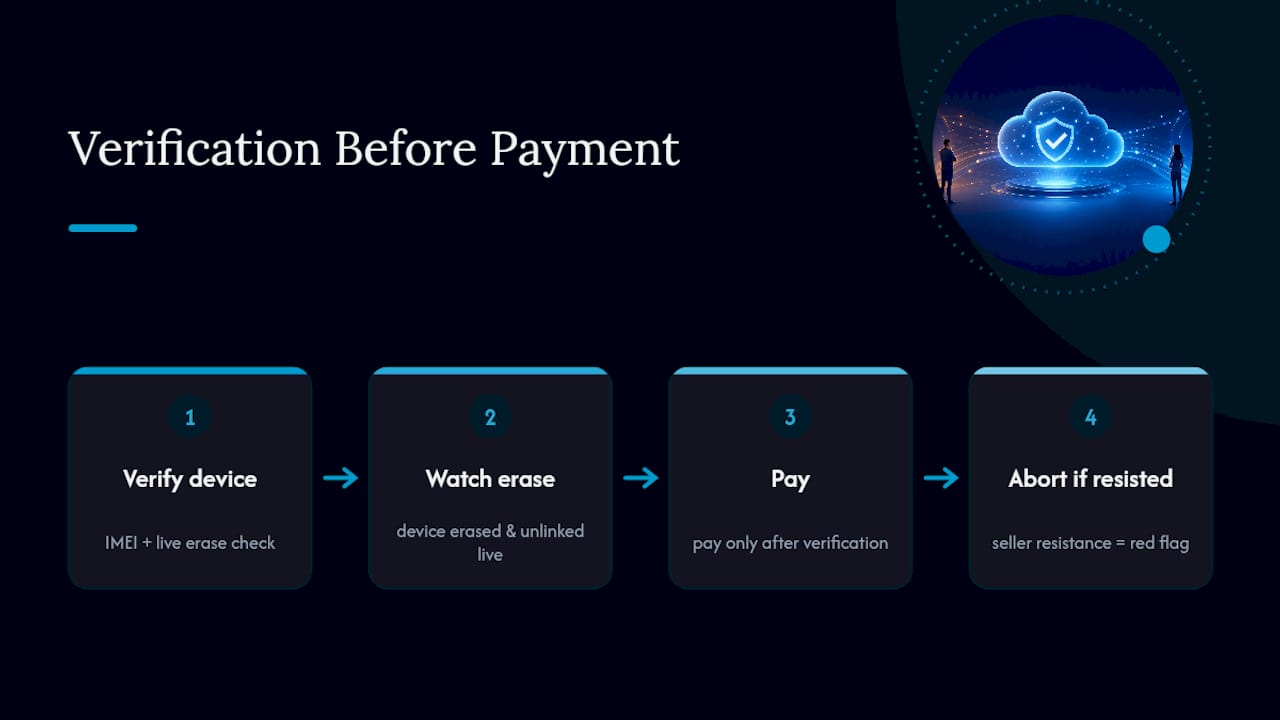
The conventional advice, “just check the IMEI,” undersells how limited that check actually is. An IMEI lookup tells you if a phone is reported lost or stolen. It tells you almost nothing about whether Activation Lock is currently engaged. The only test that matters is watching the device get erased and unlinked in real time, before any money changes hands.
If there’s one priority to take from this, it’s sequencing: verification before payment, always, not after. Sellers who resist that order, however reasonable their excuse sounds, are telling you something. Buyers who skip it are gambling on a phone that may never turn on for them.
— Saad
Buy a Phone You Know Is Clean From Day One
Every device Devicegiant sells goes through Activation Lock verification as part of the TrueGrade inspection, backed by a 90-day return window if anything is wrong at setup. That’s the direct answer to everything covered above: instead of erasing devices, checking IMEIs, and negotiating with sellers who won’t unlink their iCloud account, you get a phone confirmed clean before it ships.

Browse certified refurbished phones across brands and price points, or start with a specific model like the Samsung Galaxy A54 5G, fully unlocked and inspection-verified from $50. If you’re outfitting a small business or reselling, Devicegiant’s wholesale lots run through the same 25-point checklist as individual listings, so provenance issues never make it downstream to your customers. Check current inventory and place an order today.


