
Will Your Phone Work on a New Carrier? Here's How to Know

Your phone will work on a carrier only if two things line up: the hardware supports that carrier’s radio bands, and the phone isn’t software locked to a different network. You can find out which of those applies to you in about five minutes.
Start with the phone’s IMEI, a 15-digit number you get by dialing *#06# or checking Settings → About. Plug that number into the carrier’s BYOD (bring-your-own-phone) compatibility checker, and you’ll get one of three answers: fully compatible, compatible with limits (often no 5G), or not compatible. Separately, check whether the phone is locked in Settings, since lock status and hardware compatibility are two different problems with two different fixes.
- Run the target carrier’s IMEI/BYOD checker before doing anything else.
- Check lock status in your phone’s settings, not just “it came from Carrier X.”
- If the phone fails either check, a verified unlocked refurbished phone sidesteps both issues at once.
The FCC requires carriers to unlock eligible devices once contract or payment terms are met, but unlocking never changes what radio bands a phone physically has.
Key Takeaways
Phone carrier compatibility comes down to two independent checks, hardware band support and software lock status, both confirmed fastest through an IMEI-based BYOD tool.
| Point | Details |
|---|---|
| Check IMEI first | Dial *#06# and run it through the carrier’s BYOD checker before testing a SIM. |
| Separate lock from bands | Unlocking removes a software restriction; it never adds missing radio bands. |
| Mid-band drives real 5G | A phone missing the mid-band a carrier relies on will often show 5G but perform like LTE. |
| Test with a real SIM | A physical SIM test catches issues automated checkers sometimes miss. |
| Buy verified unlocked when unsure | A refurbished phone with confirmed IMEI status and a 90-day return window removes most guesswork. |
Table of Contents
- Phone Carrier Compatibility: A 10-Minute Verification Checklist
- How to Read Carrier IMEI Checker Results
- Why Radio Bands Decide What Your Phone Can Actually Do
- Unlocking a Phone Doesn’t Change What It Can Connect To
- eSIM and Dual-SIM Change How You Test a New Carrier
- What To Do If Your Phone Fails the Compatibility Check
- How Devicegiant Reduces Compatibility Risk on Refurbished Phones
- What I’d Actually Check Before Buying Any Phone for a New Carrier
- Where to Verify Compatibility and Unlock Status
- Frequently Asked Questions
- Sources
Phone Carrier Compatibility: A 10-Minute Verification Checklist
You don’t need a technician for this. You need four steps, done in order, and about ten minutes.
-
Get the IMEI. Dial
*#06#on the keypad, or go to Settings → About Phone (Android) or Settings → General → About (iPhone). Write it down or screenshot it. - Run the carrier’s BYOD checker. AT&T, T-Mobile, and Verizon all publish free IMEI lookup tools on their sites specifically for this. Enter the IMEI and let the tool tell you if the device is supported on that network.
- Test with a real SIM. If you can get a SIM card from the target carrier (a store rep, a friend’s old SIM, or a free trial SIM some carriers mail out), pop it in and see if it registers, makes a call, and gets data. How-To Geek’s testing guidance treats a physical SIM test as the most reliable real-world check because it catches carrier-side quirks an online tool sometimes misses.
- Gather your account info if you need an unlock. If the phone belongs to another carrier and is locked, you’ll need the account holder’s name, account number, and the IMEI to request an unlock.
That order matters. Skipping straight to a SIM test wastes time if the IMEI checker already told you the bands aren’t there. Skipping the IMEI checker means you might swap SIMs into a phone that technically works but is missing a mid-band, giving you voice and text with painfully slow data.
Before you check any of this, it helps to know the difference between two separate problems: whether the phone’s hardware supports the carrier’s frequencies, and whether the phone is software locked to its current carrier. A step-by-step IMEI check before buying a used phone catches issues both problems create, but they need different fixes once you find them.
Pro Tip: Screenshot the IMEI checker’s result page. If a carrier rep later disputes your device’s eligibility over the phone, having that screenshot on hand speeds up the manual override request.
How to Read Carrier IMEI Checker Results
IMEI checkers pull the device’s model data and compare it against a network’s approved device database, then spit back a verdict. Understanding what that verdict actually means saves you a wasted trip to a carrier store.
- Fully compatible means the model number matches an approved device, and its bands align with the carrier’s network. You’re clear to activate.
- Compatible but limited usually means voice and LTE data will work, but 5G won’t, most often because the phone is missing a mid-band the carrier depends on for 5G coverage.
- Not compatible means either the phone lacks critical bands entirely or it’s an international variant the carrier’s database doesn’t recognize, even if the hardware would technically work.
That last case trips up more people than you’d expect. Phones bought overseas, or through gray-market resellers, often carry a model number the carrier’s system has never seen, even when the physical radio inside supports the exact bands that carrier uses. The checker isn’t lying to you. It’s just matching against a list of known-good model numbers, and your phone isn’t on it.
When that happens, don’t take the automated result as final. Carriers keep manual review processes for exactly this situation. The FCC notes that technological compatibility is a separate question from unlocking eligibility, and carrier support reps can sometimes verify a phone’s actual band support and approve activation even after an automated tool flags it as incompatible. Call support, give them the IMEI, and ask specifically for a manual eligibility review rather than accepting the online tool’s answer as the last word.
One more wrinkle: an IMEI checker confirms model-level compatibility, not guaranteed performance. Two phones with the same “compatible” result can still perform differently on the same network depending on antenna design and firmware, which is part of why a physical SIM test remains worth the extra five minutes even after a clean IMEI result.
Why Radio Bands Decide What Your Phone Can Actually Do
A “band” is a specific slice of radio frequency a carrier uses to send and receive data. Every phone has a fixed set of bands built into its hardware, and no software update can add a band your radio chip doesn’t physically support. This is the single most misunderstood piece of the compatibility puzzle.
Bands go by different names depending on the generation of network. LTE bands use labels like B71 or B2. 5G bands use labels like n71 or n41. Often the number matches (B71 and n71 cover the same general frequency), which makes cross-referencing a spec sheet against a carrier’s requirements more manageable than it sounds.
Those bands also fall into three rough categories, and the category matters more than most buyers realize:
- Low-band travels far and penetrates walls well, which is why it covers wide rural areas, but it’s slower.
- Mid-band balances range and speed, and it’s the layer most U.S. carriers rely on for everyday 5G performance.
- mmWave is extremely fast but has a short range, mostly useful in dense urban pockets like stadiums or downtown blocks.
Band lookup tools map these numbers to the carriers that actually deploy them, which turns a spec sheet’s wall of numbers into a plain answer: yes or no, this phone gets full 5G on this network.
Here’s the practical version of why this matters. If a phone supports low-band and mmWave but is missing the mid-band a carrier leans on for its main 5G coverage, that phone will often still make calls and browse on LTE, but 5G speeds will disappoint or drop to 5G in name only. That’s the technical reason behind a “compatible but limited” result from an IMEI checker, and it’s also why two “5G phones” can feel completely different on the same network.
Check the manufacturer’s official spec page for the exact band list before you buy anything secondhand, and cross-reference it against your target carrier’s band lookup. It takes two minutes and prevents a returns headache. If you’re shopping for an unlocked iPhone, this step matters even more, since unlocked doesn’t automatically mean every band a US carrier uses is on board, especially with phones originally sold overseas.
Unlocking a Phone Doesn’t Change What It Can Connect To
Unlocking removes a software restriction that ties a phone to one carrier’s SIM cards. That’s the entire function. It does not add radio bands, does not upgrade firmware, and does not guarantee the phone will work well, or at all, on a different network. Plenty of buyers assume “unlocked” means “works everywhere,” and that assumption causes most of the disappointment in this whole process.
Unlocking and network compatibility solve two completely different problems. A phone can be perfectly unlocked and still perform poorly, or not connect at all, on a carrier whose bands its hardware simply doesn’t support.
Here’s how to actually check and act on lock status:
- On iPhone, go to Settings → General → About and look for Carrier Lock. Apple’s own support documentation confirms only the carrier that sold the phone can unlock it, and that checking this setting is the fastest way to confirm lock status before you do anything else.
- On Android, check Settings for a lock status option, or use How-To Geek’s method of inserting a different carrier’s SIM and watching for an “invalid SIM” or network-restriction error.
- Contact the current carrier if the phone is locked and you’ve met eligibility requirements (fully paid off, no reported loss or fraud flags).
- Provide your account information, the IMEI, and proof of purchase if the carrier asks for it.
Timelines vary by carrier. Consumer Reports documents that Verizon typically unlocks phones automatically after a waiting period post-activation, assuming the device is paid off, while T-Mobile can process an unlock request in a few days once a phone meets eligibility. AT&T falls somewhere in between depending on whether the account is postpaid or prepaid. None of these are guarantees, since fraud flags or unpaid balances can delay any of them, but they’re a realistic baseline for planning around.
eSIM and Dual-SIM Change How You Test a New Carrier
Most iPhones and many Android flagships released since 2018 support eSIM, which lets you activate service without swapping a physical card. That makes testing a new carrier considerably less disruptive than it used to be.
- eSIM speeds up switching, but the activation flow still varies by carrier, and some require you to complete setup through their own app rather than the phone’s native settings.
- Dual-SIM phones let you run a new carrier’s eSIM alongside your existing physical SIM, so you can confirm coverage and speeds before canceling your old plan.
- Physical SIM swaps remain the norm on many mid-range and budget phones. Always power the phone off before swapping, then follow the carrier’s activation steps exactly, since skipping the app-based activation step is a common reason a swap doesn’t take.
- Firmware and carrier provisioning can still block activation even on a compatible, unlocked phone if the device hasn’t received a specific carrier settings update.
What To Do If Your Phone Fails the Compatibility Check
A failed check isn’t the end of the road. It just narrows your options to three realistic paths, depending on how much time and money you want to spend.
- Short-term fix: if you like the plan pricing of an MVNO, check which host network it actually runs on (AT&T, T-Mobile, or Verizon’s infrastructure), since your phone might already support that host network even if it doesn’t support the big-name carrier directly.
- Medium-term fix: buy a fully unlocked phone that explicitly lists the bands your target carrier needs. Check the spec sheet, not just the “unlocked” label.
- Lower-risk purchase: buy a refurbished unlocked phone from a seller who verifies IMEI history and discloses cosmetic condition, and confirm the return window before paying.
- Skip third-party unlock services advertising instant unlocks for cash. Many don’t actually change anything on the carrier’s end, and some can trip fraud flags that make a legitimate future unlock harder to process.
Pro Tip: Before buying any secondhand phone, ask the seller for the IMEI and run it through a free checker yourself. A clean, unlocked result should take less than a minute to confirm, and a seller who hesitates to share the IMEI is a red flag on its own.
If a trade-in makes more financial sense than troubleshooting an incompatible phone, that’s often the fastest path to a device that actually works on your carrier from day one.
How Devicegiant Reduces Compatibility Risk on Refurbished Phones
Buying a used or refurbished phone carries one extra risk beyond what a brand-new unlocked model has: you’re trusting a stranger’s description of its lock status and condition. Devicegiant built its process around closing that gap before a phone ever ships.
- Every device goes through TrueGrade, a 25-point functional inspection that checks things a listing photo can’t show you.
- IMEI and lock status get verified before the phone is listed, so “unlocked” on the page means unlocked in practice.
- Listings clearly separate unlocked models from carrier-specific ones, so you’re not guessing which bands or restrictions apply.
- A 90-day return window backs every purchase, giving you time to actually test the phone on your carrier before that window closes.
That combination matters most for buyers who’ve already been burned once by a phone that looked fine but failed a BYOD check the day it arrived.
What I’d Actually Check Before Buying Any Phone for a New Carrier
The mistake I see most often isn’t ignorance. It’s overconfidence in a label. “Works in the US” on a resale listing means nothing specific, and international variants that look identical to the U.S. model sometimes ship with a completely different band set.
Three checks catch almost every problem: run the IMEI through the carrier’s BYOD tool, check lock status in settings rather than trusting the seller’s word, and test with a real SIM whenever you can get one. When any of those come back uncertain, I’d rather buy an inspected unlocked refurbished phone with a real return window than gamble on a listing’s claims.
Where to Verify Compatibility and Unlock Status
A handful of official sources cover almost everything you’ll need beyond this guide.
- The FCC’s cell phone unlocking guide lays out carrier obligations and response-time expectations for unlock requests.
- Apple’s support page on checking iPhone carrier lock status walks through the exact settings path and what to do once a carrier confirms an unlock.
- AT&T, T-Mobile, and Verizon each publish their own BYOD/IMEI checker tools directly on their sites, and running your IMEI through the specific carrier you’re switching to gives the most accurate result.
- Devicegiant’s landing page lists verified unlocked and carrier-specific phones if a compatibility check leaves you needing a replacement.
Frequently Asked Questions
How do I check if my phone is compatible with a specific carrier?
Get the IMEI by dialing *#06#, then enter it into that carrier’s IMEI or BYOD compatibility checker. Follow up with a physical SIM test when you can.
Does unlocking my phone guarantee it will work on any carrier? No. Unlocking only removes a software restriction tied to one carrier. Whether the phone works on another network still depends entirely on whether its hardware supports that carrier’s bands.
Why does my phone show as compatible but without 5G? This usually means the phone lacks a mid-band the carrier depends on for full 5G coverage. Voice and LTE data typically still work, but 5G speeds will be limited or unavailable.
How long does it take a carrier to unlock a phone? It varies. T-Mobile can process requests in about two days once a phone is eligible, while Verizon often unlocks devices automatically around 60 days after activation if the device is paid off.
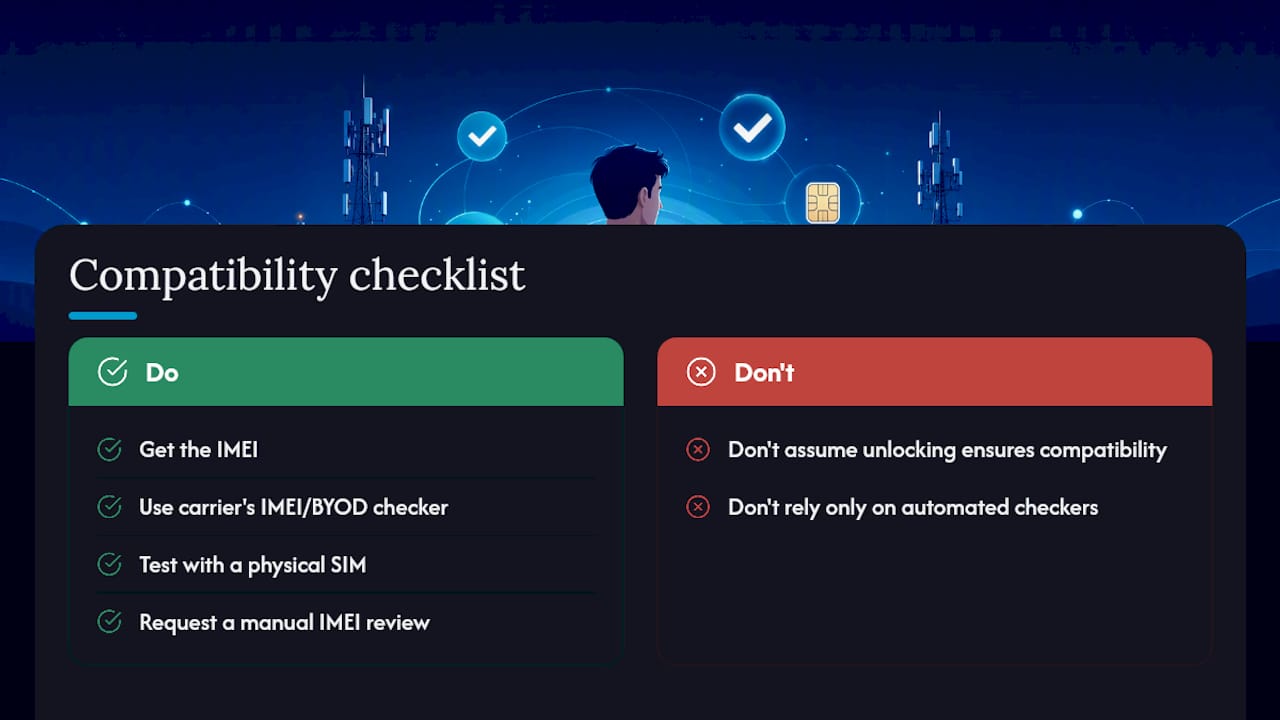
What should I do if my phone fails a carrier’s compatibility check? Call the carrier and request a manual IMEI eligibility review, since automated tools sometimes flag international model numbers incorrectly. If it’s genuinely incompatible, consider a fully unlocked replacement or a verified refurbished phone with confirmed band support.
Sources
- Cell Phone Unlocking | Federal Communications Commission
- How to unlock your iPhone for use with a different carrier - Apple Support
- How to unlock your phone from any major carrier - Consumer Reports
- USA 5G band lookup tool by carrier plus LTE equivalents


