
What Does "iCloud Locked" Actually Mean?

iCloud locked means the device is tied to someone else’s Apple ID through Activation Lock, and it cannot be activated, set up, or used until that account link is removed. This isn’t a glitch or a settings toggle you can flip. Activation Lock automatically turns on when Find My is enabled, and it stays active on Apple’s servers regardless of what happens to the phone physically.
If a device you’re holding shows this status, here’s what that immediately means for you:
- You cannot activate it, restore it, or use it as a phone in any normal sense.
- Only the original Apple ID owner or Apple itself (with proof of purchase) can release the lock.
- If you bought or found a locked device, the safest move is a return or refund, not a workaround.
Pro Tip: A locked iPhone is not “broken.” It is fully functional hardware that Apple’s servers refuse to activate for anyone but the account holder.
Key Takeaways
Activation Lock is a server-side Apple ID association that survives resets and erasures, and only the original owner or Apple with proof of purchase can remove it.
| Point | Details |
|---|---|
| Definition matters | iCloud locked means Activation Lock ties the device to an Apple ID; it blocks activation until removed. |
| Resets don’t help | Factory resets, DFU restores, and remote erases leave the server-side lock fully intact. |
| Check before buying | Watch for the “Locked to Owner” screen and confirm the seller removes the device via iCloud.com/find. |
| Only two legitimate fixes | Original-owner removal or Apple’s proof-of-purchase support request are the sole valid routes. |
| Skip locked devices | Refund or return any locked device rather than trying a bypass service. |
Table of Contents
- Understanding the iCloud Lock Status and Activation Lock Mechanics
- What a Locked Device Actually Blocks You From Doing
- How to Check If a Phone Is iCloud Locked Before You Buy
- How to Remove Activation Lock the Right Way
- Should You Buy or Accept an iCloud-Locked Device?
- Why Verified Refurbished Phones Sidestep This Problem Entirely
- The One Thing Buyers Keep Getting Wrong
- Frequently Asked Questions
- Sources
Understanding the iCloud Lock Status and Activation Lock Mechanics
Activation Lock isn’t a local setting stored on the phone. It’s a server-side record that lives on Apple’s activation servers, created the moment Find My gets switched on. Every time an iPhone, iPad, or Apple Watch goes through setup, it contacts those servers and checks its hardware identifier against the account tied to it. If that identifier is flagged as locked, activation simply won’t proceed, no matter what you do to the device itself.
This is the part most people get wrong. A factory reset doesn’t touch this record. A DFU restore doesn’t touch it. Even a remote wipe triggered through Find My leaves the device–Apple ID association fully intact on Apple’s servers. You can erase every file, every app, every trace of the previous owner’s data, and the phone will still refuse to activate for anyone else. The lock lives with Apple, not with the hardware.
A few mechanics worth knowing:
- Find My has to be manually turned on for Activation Lock to engage; it isn’t automatic from the factory.
- The server checks the device’s unique identifier against the Apple ID on file every time setup is attempted.
- Erasing data and clearing the activation lock are two completely separate processes.
There’s one real exception. Organizations using Apple’s device management tools can generate escrowed bypass codes tied to enrolled devices, which lets IT departments clear Activation Lock on company-owned hardware without needing the individual user’s Apple ID. Consumers don’t have access to anything like this.
Pro Tip: If a seller tells you “I reset it, so it’s clean,” ask them to prove Find My is off in their iCloud account, not just that the phone rebooted.
What a Locked Device Actually Blocks You From Doing
The restrictions aren’t subtle, and they show up fast once you try to set the device up. Here’s the sequence in order:
- Setup halts immediately. After a reset, the phone boots to the initial Hello screen like normal, but the moment it tries to activate over Wi-Fi or cellular, it either stalls or displays an Apple ID prompt tied to someone else’s account.
- “Locked to Owner” appears. This is the giveaway screen. It confirms Apple’s server has rejected activation because the device is still associated with a previous Apple ID.
- Data becomes inaccessible. Even if the phone was erased before you got it, you can’t get past setup to reach the home screen, apps, photos, or storage.
- Remote erase doesn’t fix any of this. Activation Lock survives a remote wipe, so a seller who erased the phone from a distance hasn’t actually solved anything for you.
Mac laptops behave a little differently, showing a firmware password prompt instead of the Hello screen, and Apple Watches require pairing with an unlocked iPhone before the same restriction surfaces. Supervised or MDM-managed devices sometimes skip these consumer-facing screens entirely because an organization’s Apple ID governs the lock instead.
How to Check If a Phone Is iCloud Locked Before You Buy
Confirming iCloud lock status takes about five minutes if you do it in person, and it should never be skipped, even when the seller seems trustworthy. Run through this sequence before money changes hands:
- Power on the device from a full reset. A legitimately unlocked phone lands on the Hello screen and walks through setup without any Apple ID prompt from a stranger’s account.
- Watch for “Locked to Owner.” If this appears after activation attempts, stop the transaction immediately.
- Ask the seller to sign out on-device or remove the device through iCloud.com/find. Apple’s own removal instructions require this step from the account holder, and a legitimate seller can do it in seconds while you watch.
- Compare the IMEI or serial number against the receipt. A proper IMEI check can also flag whether the device is reported lost or stolen, which matters just as much as the lock status itself.
A few habits will save you from getting burned:
- Never accept a screenshot as proof of removal. Screenshots can be staged or pulled from a different device entirely.
- Insist on a live demo where you watch the phone boot and activate on the spot.
- Cross-check the device’s unlock status separately from its Activation Lock status; carrier locks and iCloud locks are different problems with different fixes, and the FCC’s guidance on wireless unlocking only covers the carrier side.
How to Remove Activation Lock the Right Way
There are exactly two legitimate paths off an iCloud lock, and neither of them involves a third-party app or a paid “unlock service” you found online.
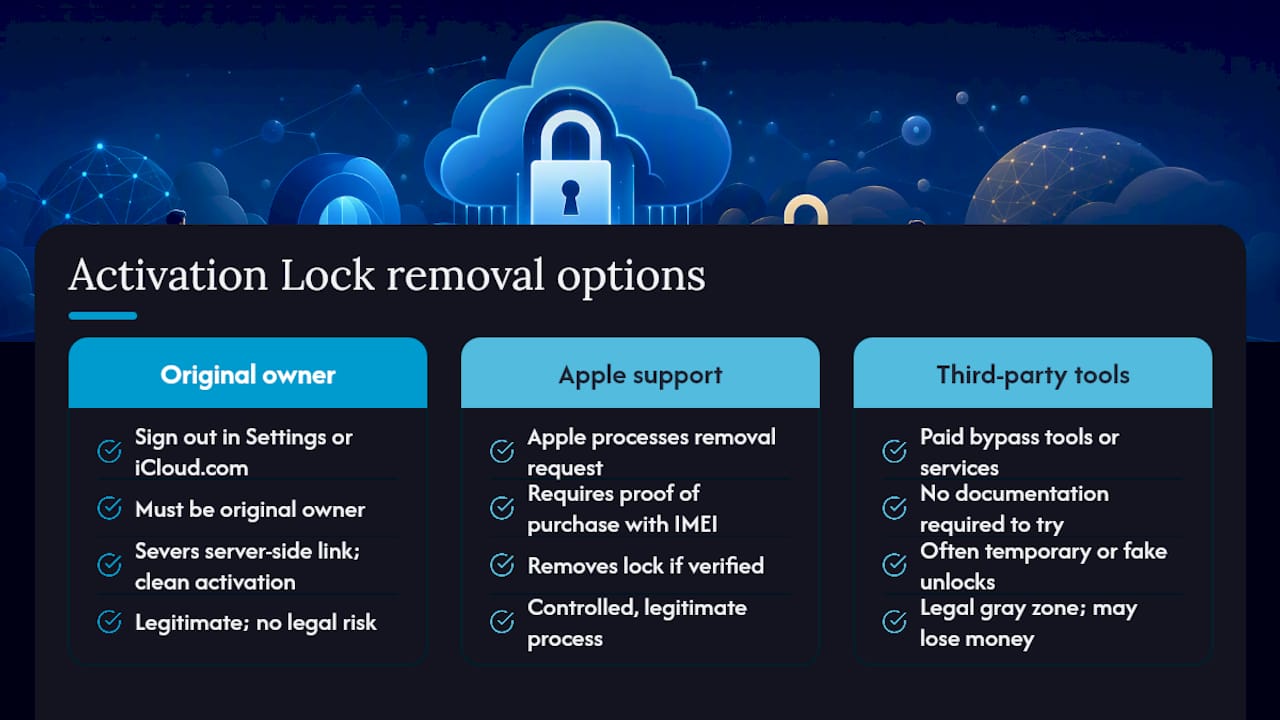
If you’re the original owner: Sign out of your Apple ID directly on the device under Settings, or log into iCloud.com/find, select the device, and choose Remove This Device. This severs the server-side link instantly and lets the next person activate it clean.
If you’re not the owner and can’t reach them: Apple can process a removal request, but only with valid proof of purchase, typically an original receipt or invoice showing the device’s IMEI or serial number. Without that documentation, Apple has no way to confirm you have any legitimate claim to the hardware, and the request goes nowhere.
For company-owned hardware: Devices enrolled through Apple School Manager or Apple Business Manager can be released using MDM-generated bypass codes, a controlled process that doesn’t apply to personal devices.
Everything else, and this matters, is a gamble. Bypass tools sold online almost universally deliver temporary or fake unlocks, and many buyers who pay for these services end up right back where they started, sometimes after losing the money too. Some of these tools also operate in a legal gray zone, since circumventing anti-theft security features can run afoul of computer fraud statutes depending on how the device was obtained.
Should You Buy or Accept an iCloud-Locked Device?
No. If a device shows “Locked to Owner” or fails to activate because of an unresolved Apple ID, walk away from the transaction rather than hoping it resolves itself later.
Here’s how to handle it depending on your situation:
- If you’re mid-purchase: Request a full refund immediately and document the “Locked to Owner” screen with photos or video timestamped at the point of sale.
- If you already paid: Contact the marketplace’s buyer-protection program right away. Most platforms have a window for disputes involving misrepresented electronics.
- If you suspect the phone is stolen: Report it to local law enforcement with the IMEI and file a report with the marketplace, since industry guidance consistently discourages any attempt to purchase or bypass a locked device under these circumstances.
- If you’re shopping fresh: Buy from sellers who explicitly verify and warranty unlock status rather than sellers who simply claim it.
The pattern holds across every case: a locked device is a liability, not a bargain, no matter how good the price looks.
Why Verified Refurbished Phones Sidestep This Problem Entirely
The entire iCloud lock risk disappears when a device has already been checked before it reaches you. That’s the gap Devicegiant’s process is built to close.
Every device that goes through Devicegiant’s TrueGrade inspection gets checked against an extensive functional and status checklist, which includes confirming the device activates cleanly with no outstanding Apple ID association. Cosmetic condition gets graded transparently too, from A down through D, so you know exactly what you’re getting before you buy.
- Every phone is confirmed unlocked and activation-ready before listing.
- A 90-day return window backs every purchase if anything turns up wrong.
- Devicegiant’s eBay feedback is overwhelmingly positive, built on thousands of transactions.
Pro Tip: Skip the private-seller gamble entirely by buying from a source that already ran the activation check for you.
Browse Devicegiant’s refurbished phone lineup if you’d rather skip the checklist and buy something Apple’s servers have already cleared.
The One Thing Buyers Keep Getting Wrong
Most advice about Activation Lock focuses on how to remove it, and almost none of it focuses on how to avoid the situation entirely. That’s backwards. By the time you’re staring at “Locked to Owner” on a phone you already paid for, you’ve already lost the leverage that mattered most: the ability to walk away before money changed hands.
The conventional wisdom treats a factory reset as proof of a clean device. It isn’t, and Apple’s own documentation makes that clear. What actually protects you is asking the seller to remove the device from their account while you watch, not trusting a reset or a screenshot.
If there’s one priority worth acting on, it’s this: verify activation status live, in person or on a video call, before any payment is final. Everything else, IMEI checks, receipts, return policies, matters, but it’s secondary to that one live confirmation.
Frequently Asked Questions
What does it mean when a phone says iCloud locked? It means Activation Lock has tied the device to an Apple ID, and the device cannot be set up or used until that account is removed by the owner or through Apple’s support process.
Does erasing an iPhone remove the iCloud lock? No. Erasing, resetting, or restoring the device does not touch the server-side Apple ID association that Activation Lock relies on.
Can I unlock an iCloud-locked phone myself? Only if you’re the original owner with access to the Apple ID, either by signing out on-device or removing it through iCloud.com/find. Otherwise, Apple requires proof of purchase to process a removal.
Are third-party iCloud unlock services safe to use? Generally not. Most bypass services provide unstable or fake unlocks, and some operate in legally questionable territory.
How can I avoid buying a locked phone? Ask the seller to remove the device from Find My while you watch, check the IMEI against the receipt, and never rely on a screenshot as proof of removal.
Sources
- Activation Lock for iPhone and iPad - Apple Support
- How to Remove iCloud Activation Lock from a Used iPhone | Step-by-Step Guide
- The lowdown on Apple’s Activation lock: 4 things you need to know


