
Is a Refurbished Laptop Worth It? Your 2026 Buyer's Guide

Yes, a refurbished laptop is worth it for most buyers — particularly students, remote workers, and anyone who needs a reliable machine without paying full retail price. Certified refurbished units from reputable sellers routinely save you 15–50% off the original price, often with warranties attached, and buying one keeps a working device out of a landfill. The catch is that not all refurbished laptops are equal, and the wrong purchase can leave you with a dead battery and no recourse.
Here is the short version before you dig in:
- Buy certified refurbished if you want performance close to new, a real warranty, and documented testing.
- Prefer new if you need the latest AI NPU, a dedicated GPU for gaming, or bleeding-edge hardware released in the past 12 months.
- Test the battery on arrival — it is the single component most likely to disappoint, and most return windows give you time to check it.
Key Takeaways
Certified refurbished laptops save 15–50% versus new, perform comparably for everyday tasks, and reduce e-waste — provided you verify battery health, warranty length, and seller inspection standards before buying.
| Point | Details |
|---|---|
| Savings range | Certified refurbs typically save 15–30%; reputable third-party sellers often reach 20–40% off new retail. Extreme discounts above 50% are a red flag. |
| Battery is the critical check | Always request battery capacity percentage; below 80% warrants negotiation or a pass. |
| Warranty minimum | Require at least 90 days; one year is the standard for manufacturer-certified programs. |
| OS support matters | Confirm the machine runs Windows 11 or a current supported OS — Windows 10 support ended prior to 2026. |
| Devicegiant as a verified option | Devicegiant’s 25-point inspection, disclosed grading, and 90-day return policy make it a low-risk starting point for verified refurbished devices. |
Table of Contents
- What “refurbished” actually means (vs. used, renewed, and open-box)
- Pros and cons: money, performance, and environmental impact
- How refurbished laptops actually perform compared to new ones
- What to check before you buy: a practical buyer’s checklist
- Where to buy refurbished laptops in the U.S.
- How long a refurbished laptop will last
- The part most buyers get wrong about refurbished laptops
- Devicegiant offers verified refurbished devices with clear grading
- Useful sources and further reading
What “refurbished” actually means (vs. used, renewed, and open-box)
The terms get mixed up constantly, and the difference matters more than most listings make clear. Understanding them is the first step toward a smart purchase. For a deeper look at how these labels apply to smartphones and tablets too, the terminology breakdown at Devicegiant is worth a read.
| Label | Condition | Testing performed | Typical warranty |
|---|---|---|---|
| Manufacturer certified | Near-new; cosmetic defects rare | Full factory inspection, parts replaced to spec | 1 year (often matches new) |
| Refurbished (Grade A) | Minimal cosmetic wear | Functional test, battery check, OS reinstall | 90 days to 1 year |
| Refurbished (Grade B) | Light scratches, scuffs visible | Functional test, may include part replacement | 90 days |
| Refurbished (Grade C) | Noticeable wear, possible dents | Basic functional test | — |
| Renewed | Varies widely; Amazon’s label | Inconsistent; seller-dependent | 90 days (Amazon guarantee) |
| Open-box | Opened but unused or barely used | Minimal; usually just repackaged | Manufacturer warranty may still apply |
| Used / as-is | Unknown condition | None | None |
Manufacturer-certified and Grade A units are the lowest-risk options for most buyers. Grade B is fine for secondary devices or tight budgets, as long as you verify battery health. Grade C and “as-is” listings are for experienced buyers who can diagnose and repair hardware themselves.
Pros and cons: money, performance, and environmental impact
The case for buying refurbished
The savings are real. Manufacturer-certified programs typically offer notable discounts off new retail; reputable third-party refurbishers often offer somewhat larger savings. On a $1,500 MacBook Pro or a $1,200 ThinkPad, that gap is several hundred dollars.
Beyond price, refurbished laptops give you access to premium builds that would otherwise be out of reach. A two-year-old business-class laptop with a metal chassis, a full-size keyboard, and a quality IPS display often beats a brand-new budget machine in every measurable way.
The environmental argument is harder to ignore every year. Global e-waste is rising five times faster than documented recycling rates, according to the Global E-waste Monitor 2024. Manufacturing a new laptop generates significant carbon emissions before it ever ships. Buying refurbished extends the life of a device that already exists, which avoids the raw material extraction and production emissions tied to building something new.
The real downsides
- OS support risk. Windows 10 support ended before 2026, meaning any refurbished machine still running it no longer receives security patches. Always verify the device can run Windows 11 or a current supported OS.
How refurbished laptops actually perform compared to new ones
For everyday tasks, the performance gap between a well-chosen refurbished laptop and a new one is nearly invisible. Web browsing, email, video calls, document editing, and light photo work all run fine on hardware that is two or three years old, provided the specs were solid to begin with.
Certified refurbished devices often match new performance for standard productivity workflows, while third-party refurbs are more variable depending on the seller’s inspection standards. The hardware itself does not degrade the way a battery does; a CPU from 2022 runs the same code at the same speed it always did.
Where the gap opens up is at the edges. Buyers who need the latest AI NPU or dedicated GPU features should lean toward new hardware, since those components are simply not present in older machines.
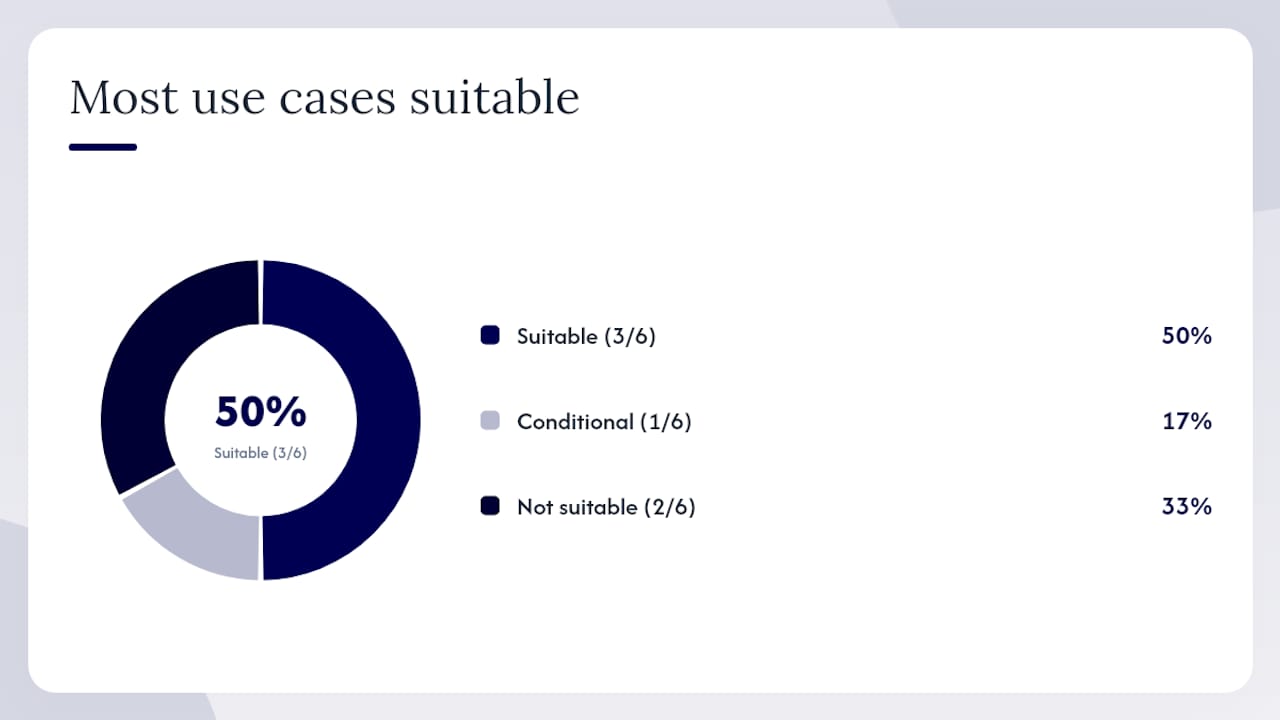
| Use case | Refurbished suitable? | Notes |
|---|---|---|
| Web, email, video calls | Yes | Any mid-range chip from 2021+ handles this easily |
| Office productivity (Word, Sheets, Zoom) | Yes | 8GB RAM minimum |
| Light photo/video editing | Usually | Depends on RAM and SSD speed; check specs carefully |
| Gaming (modern titles) | No | Dedicated GPU needed; refurb options are limited and pricier |
| AI-heavy workflows (local LLMs, Copilot+) | No | Requires 2025-gen NPU; not available in older hardware |
| Second device / travel laptop | Yes | Ideal use case; lower stakes if something goes wrong |
What to check before you buy: a practical buyer’s checklist
Follow this sequence before you hand over payment, and again within the first few days after the laptop arrives.
Before you buy:
- Confirm the warranty length. Minimum 90 days; one year is better. No warranty is a hard pass unless you are buying Grade C for parts.
- Check the battery health policy. Does the seller disclose cycle count or capacity percentage? If not, ask directly.
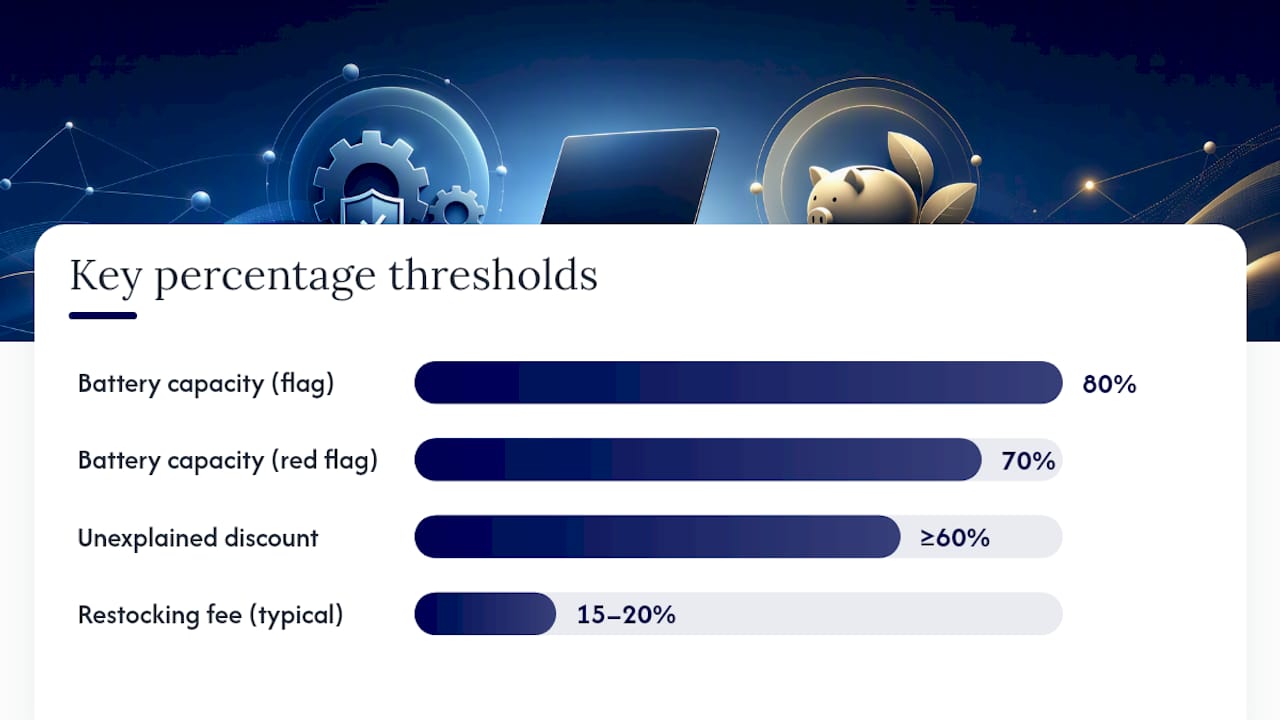
- Read the return policy. Look for a no-restocking-fee window of at least 14 days. Some sellers charge 15–20% to return, which erases your savings if something is wrong.
- Verify seller reputation. Look for consistent positive feedback across multiple reviews, not just a handful. On marketplaces, check the seller’s total transaction count and dispute rate.
- Confirm grading and photo disclosures. The listing should state the grade explicitly and show real photos of the actual unit, not stock images.
- Check the serial number. Run it through the manufacturer’s website to confirm the model, warranty status, and that it has not been reported stolen.
On arrival:
- Test every port. USB-A, USB-C, HDMI, headphone jack — plug something into each one.
- Check the screen. Open a solid white image and look for dead pixels, backlight bleed at the corners, and yellowing.
- Test Wi-Fi and Bluetooth. Connect to a network and pair a device.
- Run the webcam and microphone. A quick video call or recording confirms both work.
- Type a paragraph. Every key, including function keys and the trackpad click.
-
Check battery capacity. On Windows, run
powercfg /batteryreportin Command Prompt. On Mac, hold Option and click the battery icon. A battery below 80% capacity is worth flagging with the seller before your return window closes. - Watch for overheating. Run a YouTube video for 20 minutes and check whether the fan runs constantly or the chassis gets uncomfortably hot.
Red flags that should trigger a return:
- Battery capacity below 70% with no prior disclosure
- Discount of 60% or more with no explanation of the grade or condition
- Stock photos only in the listing
- No warranty documentation included in the box
- Extreme discounts are a consistent red flag across buyer guides — a legitimate seller does not need to price that aggressively
Where to buy refurbished laptops in the U.S.
The channel you buy through shapes your risk as much as the grade does.
- Manufacturer certified programs — (Apple Certified Refurbished, Dell Outlet, Lenovo Outlet): The safest option. Devices are inspected to factory standards, often come with a one-year warranty, and are backed by the original manufacturer’s support. Prices are typically 15–25% off new, so savings are modest but risk is minimal.
- Major retailers with certified refurb programs — (Best Buy Geek Squad Certified, Walmart Restored): A middle ground. Inspection quality varies by retailer, but return policies are usually strong and you have a physical store to visit if something goes wrong.
The same logic applies whether you are buying a laptop or a smartphone. Devicegiant’s approach to refurbished phones illustrates what transparent grading and a documented inspection process look like in practice.
How long a refurbished laptop will last
A well-chosen refurbished laptop from a reputable seller, used for everyday productivity, can last multiple years from the date you buy it. Grade A units with replaced batteries and clean SSDs can push toward the higher end of that range. Grade C units with original aging components are a shorter bet.
Warranty length is a useful proxy for the seller’s confidence in the device. A 90-day warranty is the floor — anything shorter suggests the seller is not willing to stand behind the hardware. One year is the standard for manufacturer-certified programs and the better specialist refurbishers.
One number worth keeping in mind: Windows 10 support ended before 2026. Any refurbished laptop still running Windows 10 is now operating without security updates. Before you buy, confirm the machine either already runs Windows 11 or meets the hardware requirements to upgrade — specifically TPM 2.0 and a supported CPU. Machines that cannot upgrade have a shortened useful life from a security standpoint.
Battery replacement is part of the ownership math for any refurbished device. A new battery for most business laptops costs $50–$80 and extends the machine’s useful life by two or more years. Factor that into your total cost of ownership calculation, especially if the listing does not confirm a replaced battery.
Resale value holds reasonably well for premium brands. A refurbished ThinkPad or MacBook retains more value than a budget new laptop, which means your exit price is better if you decide to upgrade in a few years.
The part most buyers get wrong about refurbished laptops
The conventional wisdom says the biggest risk with a refurbished laptop is reliability. That framing sends buyers chasing warranty length as the main signal of quality, when the real variable is the inspection process behind the device.
A one-year warranty on a laptop that was never properly tested is worth less than a 90-day warranty from a seller who documented every component, replaced the battery, and can show you the capacity percentage. The warranty is only as good as the work that preceded it.
The other thing buyers consistently underestimate is the OS support angle. A refurbished laptop running an unsupported operating system is not a bargain — it is a security liability. With Windows 10 now past end-of-life, this is a real and immediate concern, not a theoretical one. Checking TPM 2.0 compatibility before you buy takes two minutes and can save you from owning a machine that cannot be safely connected to the internet.
The environmental case for refurbished is stronger than most buyers realize. The Global E-waste Monitor 2024 documents e-waste rising faster than any other waste stream. Choosing a refurbished device is one of the most direct individual actions available to reduce that number. That is not marketing language — it is a measurable outcome.
Buy certified, check the battery, verify OS support, and use the return window. Those four steps cover the vast majority of the risk.
Devicegiant offers verified refurbished devices with clear grading
If you want to skip the guesswork on seller credibility, Devicegiant’s approach is worth knowing. Every device goes through a 25-point functional inspection, cosmetic grading is disclosed upfront (A through D), and the 90-day return policy gives you a real window to run the arrival checklist described above. That combination of documented testing and a no-pressure return window is exactly what separates a trustworthy refurbished purchase from a gamble.

Devicegiant’s inventory spans refurbished smartphones, tablets, smartwatches, and select laptops — all graded, inspected, and backed by 99.8% positive eBay feedback. Whether you are buying one device or sourcing bulk inventory for resale, the grading transparency means you know what you are getting before it ships.
Browse verified refurbished devices at Devicegiant and use the arrival checklist from this article during your return window. That is the lowest-risk path to a refurbished device that actually delivers on its price.
Useful sources and further reading
| Source | What it covers |
|---|---|
| Windows 10 end-of-support — Microsoft | Official confirmation that Windows 10 security updates ended October 14, 2025 |
| Global E-waste Monitor 2024 — UNITAR | Scale and growth rate of global electronic waste; context for the sustainability argument |
| 6 surprising e-waste facts — PIRG | Key findings from the 2024 UN e-waste report on recycling shortfalls |
| Refurbished vs. New Laptop 2026 — Newegg Insider | Hardware nuance for 2026: AI NPU, GPU differences, and certified refurb performance |
| Refurbished Tech vs New: Complete Buying Guide — NextTechBuy | Savings ranges, certification guidance, and red flag pricing thresholds |
| Should you buy a refurbished laptop? — Laptop Mag | Practical arrival tests, battery-check procedures, and red flags |
| Is a Refurbished Laptop Worth It? — TechReviewAdvisor | Balanced pros and cons, discount ranges, and warranty variability |
| Why buy refurbished laptops? — Human-I-T | Grading and certification explanations; case for Grade A and manufacturer-certified units |
| Are Refurbished Laptops Worth Buying in the U.S.? — TechWave247 | U.S.-focused buyer examples, typical savings bands, and model-level suggestions |


