
Unlocked Phones on Verizon: What You Need to Know

Yes, an unlocked phone will work on Verizon — provided it supports the right frequency bands and clears the carrier’s IMEI check. Your first move is to run the phone’s IMEI through Verizon’s compatibility checker before you do anything else. From there, activation typically takes a short time online. The FCC confirms that carriers must publish their unlocking policies and that consumers have the right to unlock eligible devices. So, you’re on solid legal ground. If you’re still shopping, Devicegiant’s verified refurbished listings include model-specific network notes that make the compatibility question much easier to answer before you buy.
Key Takeaways
An unlocked phone works on Verizon when it supports the right LTE and 5G bands, clears the IMEI check, and is activated with a compatible Verizon plan — the entire process from check to working phone typically takes under an hour.
| Point | Details |
|---|---|
| Check IMEI and bands first | Run the IMEI through Verizon’s checker and confirm Band 13 LTE support before buying or activating. |
| Activation takes under an hour | New and existing customers can activate online via My Verizon; eSIM activation is the fastest path for supported models. |
| Verizon’s unlock timeline | Postpaid devices unlock automatically after 60 days of active service; prepaid devices require 12 months. |
| IMEI blacklist is the top risk | A blacklisted IMEI will be rejected at activation — always verify with a blacklist check before purchase. |
| Devicegiant reduces buyer risk | A 25-point inspection, 90-day return policy, and model-specific network notes make Devicegiant a low-risk buying route for Verizon-compatible refurbished phones. |
Table of Contents
- Will an unlocked phone work on Verizon? How to check compatibility
- How to activate an unlocked phone on Verizon
- What is Verizon’s device locking policy?
- Where to buy an unlocked phone that works on Verizon
- If your unlocked phone won’t get Verizon service
- When does buying unlocked for Verizon actually make sense?
- Devicegiant has verified unlocked phones ready for Verizon
- Sources
Will an unlocked phone work on Verizon? How to check compatibility
Verizon runs on a specific set of LTE and 5G NR bands, and a phone that doesn’t support them will either get no signal or drop to a slower network than you’re paying for. Band 13 (700 MHz) has historically been Verizon’s core LTE band, and Band 48 (CBRS) plus the C-band spectrum (Band 77) are central to its 5G rollout. A phone that lists those bands in its specs is a strong candidate. One that doesn’t is a problem, regardless of how new or expensive it is.
How to run an IMEI check
Every phone has a unique 15-digit IMEI. Dial *#06# to pull it up, or find it in Settings under “About Phone.” Then:
- Go to Verizon’s device compatibility page and enter the IMEI.
- Check whether the result shows full 4G LTE, VoLTE, and 5G support.
- Cross-reference with the phone’s published spec sheet for band support.
Devicegiant’s product pages list model variants and CDMA/GSM notes directly, which cuts out a lot of guesswork. Their guide on how to tell if a phone is unlocked walks through exactly what to look for before you commit to a purchase.
eSIM vs. physical SIM on Verizon
Most flagship iPhones (iPhone XS and later) and recent Samsung Galaxy models support Verizon eSIM activation. eSIM is faster to set up and eliminates the wait for a physical SIM card. That said, not every unlocked phone supports Verizon’s eSIM provisioning even if it technically has eSIM hardware, so confirm your specific model on Verizon’s supported device list.

Carrier-locked vs. factory-unlocked: what actually matters
A factory-unlocked phone ships without any carrier software restrictions. A carrier-locked phone is tied to one network until it meets the carrier’s unlock criteria. The model variant matters too: some phones are sold in a “North America” or “Global” SKU that includes CDMA support, while others are GSM-only and will never fully work on Verizon. Always confirm the exact model number (not just the name) matches a Verizon-compatible SKU.
| Feature | Factory Unlocked | Carrier Locked | Refurbished Unlocked |
|---|---|---|---|
| Works on Verizon immediately | Yes, if bands match | No, until unlock criteria met | Yes, if bands match and IMEI is clean |
| VoLTE / HD calling support | Depends on model | Usually provisioned | Depends on model |
| 5G support | Depends on model | Depends on model | Depends on model |
| Warranty | Manufacturer | Carrier/Manufacturer | Seller policy (e.g., 90-day return) |
| Price vs. new | Full retail | Subsidized or financed | Significantly less |
Pro Tip: On any product page, look for the exact model number (e.g., SM-A146U for the Samsung Galaxy A14 5G) rather than just the name. The “U” suffix on Samsung models typically indicates a US carrier-compatible variant.
How to activate an unlocked phone on Verizon
Before you start, gather: your phone’s IMEI, the SIM card number (ICCID) printed on the SIM tray or packaging, your Verizon account credentials, and the plan you want to activate. Verizon’s activation tools are available online and through the My Verizon app.
New customers
- Go to Verizon’s activation page and select “New customer.”
- Choose a postpaid or prepaid plan.
- Enter your IMEI when prompted to verify device compatibility.
- Insert the Verizon SIM card (nano-SIM for most modern phones) or follow the eSIM QR code instructions.
- Complete account setup: billing info, PIN, and security questions.
- Wait for the network profile to provision — usually 5–15 minutes.
- Restart the phone and confirm you have signal and data.
Existing customers adding or swapping a device
- Sign in to My Verizon and select “Add a device” or “Swap device.”
- Enter the new phone’s IMEI.
- If swapping: transfer your existing SIM or activate a new one.
- Confirm your number transfer (porting) if you’re bringing a number from another carrier — this can take up to 24 hours.
- After activation, go to Settings and confirm VoLTE (HD calling) is enabled.
eSIM activation path
For supported devices, select “eSIM” during activation. Verizon will send a QR code to your email. Scan it from the phone’s camera app, follow the on-screen prompts, and the profile downloads directly. No physical SIM required.
Mini troubleshooting checklist for activation failures:
- IMEI rejected: the device may be blacklisted or carrier-locked — run a separate IMEI blacklist check.
- Provisioning delay: wait 30 minutes, then restart. If still no signal, call Verizon support and request a provisioning refresh.
- VoLTE not working: go to Settings > Mobile Network > Enable VoLTE, or ask Verizon support to provision HD calling on your account.
- eSIM not downloading: confirm your phone model is on Verizon’s eSIM-supported list and that the QR code hasn’t expired.
What is Verizon’s device locking policy?
Verizon’s approach to locking has evolved. For most postpaid devices purchased after 2019, Verizon automatically unlocks the device after 60 days of active service, provided the account is in good standing. Prepaid devices follow a different timeline.
Key points from Verizon’s policy:
- Postpaid devices are typically unlocked automatically after 60 days of active service on the account.
- Prepaid devices generally require 12 months of active service before they become eligible for unlocking.
- Outstanding device payments can delay or block unlocking. Verizon’s device payment agreement ties unlock eligibility to payment status — a phone on a 36-month installment plan may not unlock until the balance is paid or the service window is met.
- Military deployment and certain account hardship situations may qualify for expedited unlocking — contact Verizon support directly.
- To request an unlock manually, contact Verizon customer service by phone, chat, or in-store. You’ll need your account PIN, the device IMEI, and proof that the eligibility conditions are met.
The FCC’s cell phone unlocking guidance is the baseline consumer-rights document here. Carriers are required to publish their unlocking policies publicly and must unlock eligible devices upon request. If Verizon denies an unlock request you believe is eligible, the FCC is the place to file a complaint.
Where to buy an unlocked phone that works on Verizon
The buying decision breaks down into three routes: new factory-unlocked, certified unlocked (often manufacturer-refurbished), and verified refurbished from a third-party seller. Each has a different risk and cost profile.
Before you buy anything, confirm:
- The exact model SKU supports Verizon’s LTE bands (especially Band 13) and 5G bands if you want 5G.
- The IMEI is clean — not reported lost, stolen, or blacklisted.
- The seller offers a return window long enough to test the phone on Verizon’s network.
- The device is fully paid off if it was previously on a carrier installment plan.
New vs. certified vs. refurbished
New factory-unlocked phones carry the full manufacturer warranty and zero carrier history, but you pay full retail. Apple iPhone 15 or Samsung Galaxy S24 bought directly from Apple or Samsung fall here. The trade-off is straightforward: maximum protection, maximum cost.
Certified unlocked devices, often sold through manufacturer programs, are typically lightly used or returned units.
Verified refurbished from a seller like Devicegiant sits at the value end. Devicegiant’s 25-point inspection covers functionality across hardware and software, and each listing discloses cosmetic grade (A through D) alongside model and network details. The 90-day return policy gives you a real window to confirm the phone works on Verizon before you’re committed. Pricing runs significantly below new retail — a Samsung Galaxy S22 Plus 5G, for example, is available from $146.
For buyers who want a budget-friendly entry point, the Samsung Galaxy A14 5G CDMA/GSM unlocked listing on Devicegiant explicitly notes the model variant and network compatibility, which is exactly the kind of transparency that saves a return trip.
Pro Tip: Ask any seller two questions before buying: “Was this device ever reported lost or stolen?” and “Is this the exact model SKU that supports Verizon’s Band 13 LTE?” A seller who can’t answer both clearly is a seller to skip.
If your unlocked phone won’t get Verizon service
No signal after activation is frustrating, but the cause is almost always one of five things:
- Blacklisted IMEI: the phone was reported lost, stolen, or has an unpaid balance. Run the IMEI through a third-party blacklist checker (GSMA Device Check or similar) to confirm.
- Incompatible bands: the phone physically cannot connect to Verizon’s network. Check the spec sheet against Verizon’s band list — if Band 13 isn’t there, no amount of troubleshooting will fix it.
-
Wrong APN settings: Verizon’s APN is
vzwinternet. Go to Settings > Mobile Network > Access Point Names and confirm it’s set correctly. - VoLTE not provisioned: calls may drop or fail on a 5G-only network if VoLTE isn’t enabled on your account. Call Verizon and ask them to provision HD calling for your line.
- eSIM provisioning error: the profile didn’t download correctly. Delete the eSIM profile and re-scan the QR code, or request a new activation code from Verizon.
Quick diagnostic steps:
- Reinsert the SIM card (or delete and re-add the eSIM profile).
- Go to Settings > General > Transfer or Reset > Reset Network Settings.
- Manually select Verizon as the network operator under Mobile Network settings.
- Update carrier settings: on iPhone, go to Settings > General > About and wait for a carrier update prompt.
- If none of that works, call Verizon support with your IMEI ready and ask for a provisioning refresh. Verizon’s provisioning systems document that a re-provisioning from the account side resolves most persistent connectivity issues.
When you escalate to Verizon support, have your IMEI, phone model and exact SKU, and a screenshot of your network status screen ready. That information cuts the call time significantly.
When does buying unlocked for Verizon actually make sense?
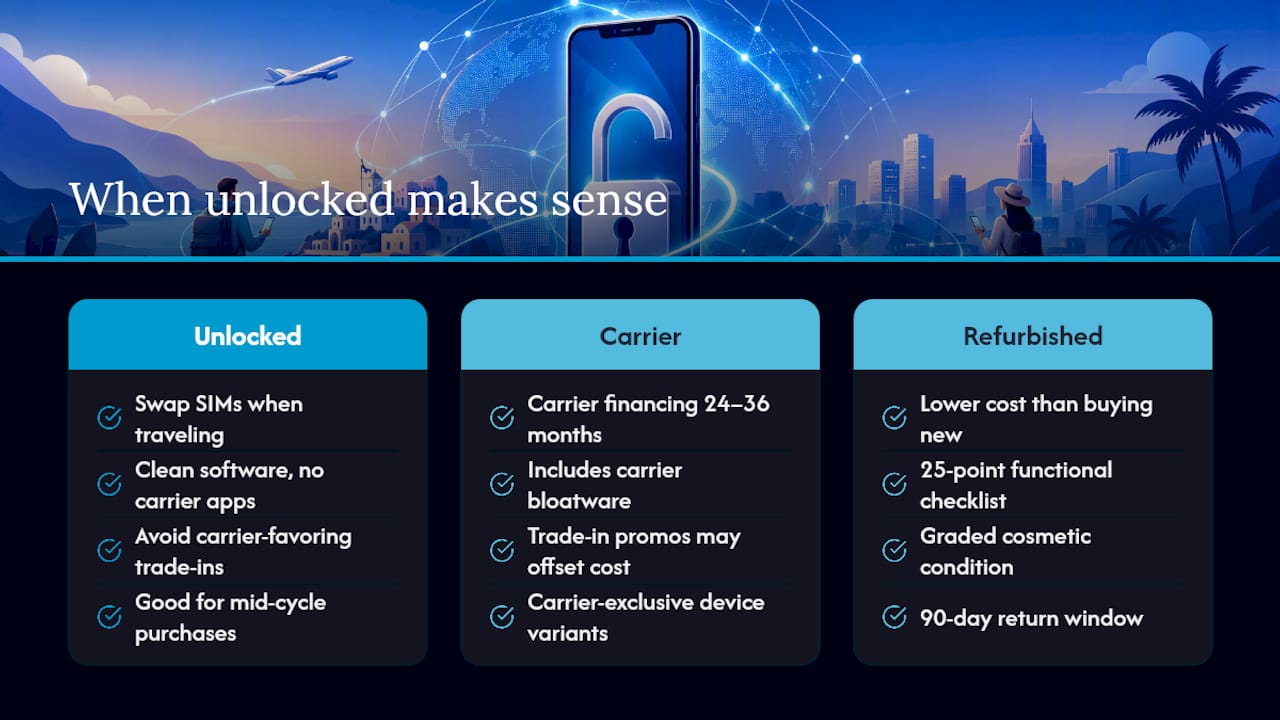
The conventional wisdom says “just buy from Verizon and avoid the hassle.” That’s not wrong, but it’s incomplete. Carrier-purchased phones come with bloatware you didn’t ask for, financing terms that lock you in for 24–36 months, and trade-in values that benefit the carrier more than you. For a lot of buyers, unlocked is the smarter move.
Unlocked makes the most sense when you travel internationally and need to swap SIMs, when you want a clean software experience without carrier apps, or when you’re buying a mid-cycle phone and don’t want to pay full retail for a model that’s six months from its successor. A verified refurbished Samsung Galaxy or Apple iPhone from a seller with a real return policy and a documented inspection process gives you most of the protection of buying new at a fraction of the cost.
Carrier-specific devices still win in a few situations: if you want carrier financing spread over 36 months with no upfront cost, if a carrier is running a trade-in promotion that genuinely offsets the price, or if you need a device that’s exclusive to a carrier variant (some Verizon-exclusive hardware configurations exist for certain models).
For price-sensitive buyers and eco-conscious consumers, the refurbished route through a seller like Devicegiant is hard to argue against. You get a phone that’s been checked against a 25-point functional checklist, graded for cosmetic condition, and backed by a 90-day return window. That’s more protection than most private-party sales and a lot less money than buying new. Pair it with a rugged case if you’re hard on hardware, and you’ve got a setup that lasts.
Devicegiant has verified unlocked phones ready for Verizon
Skipping the carrier store doesn’t mean skipping protection. Devicegiant’s refurbished and unlocked phones are inspected against a 25-point checklist before they ship, graded for cosmetic condition so you know exactly what you’re getting, and backed by a 90-day return policy. Pricing runs significantly below new retail, which means flagship-tier hardware at a price that doesn’t require a financing plan.

Product pages on Devicegiant list model variants, CDMA/GSM compatibility notes, and network details — the exact information you need to confirm a phone will work on Verizon before you order. The OnePlus 12R 5G starts at $265 for buyers who want 5G performance without flagship pricing. Browse the full catalog of refurbished unlocked phones and filter by the specs that matter for Verizon compatibility. If you have a question about a specific model’s network support, Devicegiant’s customer support team can confirm before you buy.
Sources
Use these pages to confirm policy, check your device, and find compatible phones:
- Federal Communications Commission (FCC) — Cell Phone Unlocking
- Verizon — Thingspace / device provisioning dashboard


