
eSIM vs Physical SIM: Which Should You Choose in 2026?

For most U.S. users in 2026, an eSIM is the better default. It activates in minutes, reduces SIM-swap fraud risk, and lets you run two lines on one phone without carrying a second card. That said, a physical SIM still makes sense in a few situations:
- You own an older phone that does not support eSIM, or you are buying a refurbished device and have not confirmed eSIM compatibility yet.
- Your carrier is a smaller MVNO that still defaults to physical SIM issuance.
- You travel to regions where local SIM swapping at a kiosk is faster or cheaper than sourcing a local eSIM.
The sections below cover compatibility checks for iPhones and Android phones, step-by-step activation on Verizon, AT&T, and T-Mobile, and a security breakdown with a checklist you can use before switching.
Key Takeaways
For most U.S. users with a compatible device, eSIM is faster to activate, more secure against SIM-swap fraud, and supports multiple lines without extra hardware.
| Point | Details |
|---|---|
| eSIM is the modern default | Most U.S. flagship phones since 2022 support eSIM; iPhone 14 U.S. models are eSIM-only. |
| Physical SIM stays relevant | Older phones, some MVNOs, and international kiosk swaps still favor a physical card. |
| Security advantage is real | eSIM cannot be physically stolen; account-level MFA and a carrier PIN close the remaining gap. |
| Verify before buying refurbished | Confirm the device is unlocked and eSIM-capable before purchase, not after. |
| Travel setup: run both | Keep your home eSIM for SMS and 2FA; add a travel eSIM for data to avoid 2FA lockouts. |
Table of Contents
- What is the difference between a physical SIM and an eSIM?
- How do eSIM and physical SIM compare across the decisions that matter?
- Which phones and U.S. carriers support eSIM?
- How do you activate or transfer an eSIM on iOS and Android?
- Is eSIM more secure than a physical SIM?
- Which format should you choose for your situation?
- What should you know about travel, dual-SIM, and activation problems?
- Why eSIM is the right call for most people buying phones today
- Sources
What is the difference between a physical SIM and an eSIM?
A physical SIM is a small removable plastic chip you slide into a tray on your phone. It stores your carrier credentials and identifies your line on the network. Swap the chip, and you switch carriers or numbers. It is the same basic technology that has been in phones since the early 1990s, just shrunk from a credit-card-sized card to the nano-SIM format most phones use today.
An eSIM (embedded SIM) is a chip soldered directly onto the phone’s motherboard. Instead of swapping plastic, you download a carrier profile over the air, usually by scanning a QR code or tapping through a carrier app. The profile is stored digitally, and you can hold multiple profiles on one device, switching between them in Settings without touching the hardware.
Think of it this way: a physical SIM is a physical key you carry in your wallet. An eSIM is a digital key stored inside the lock itself, reprogrammable from anywhere with an internet connection.
The technical difference comes down to delivery and storage. A physical SIM writes credentials to a chip at the factory and ships it to you. An eSIM receives credentials remotely through a process called over-the-air provisioning. Both formats identify your device to the carrier’s network in exactly the same way once active, per CNET’s breakdown of SIM card types.
Key differences at a glance:
- Physical SIM: removable, carrier-specific chip; requires physical access to swap; one active profile per slot.
- eSIM: embedded, programmable chip; profiles downloaded remotely; multiple profiles stored simultaneously.
- Both: deliver identical network performance. Signal quality depends on carrier coverage and your phone’s antenna, not which SIM format you use.
How do eSIM and physical SIM compare across the decisions that matter?
| Dimension | eSIM | Physical SIM |
|---|---|---|
| Ease of switching | Download a new profile in minutes via QR code or app | Requires a new physical card; typically needs some time for shipping and setup |
| Device & carrier compatibility | Requires a compatible device and carrier support; most 2022+ flagships qualify | Works on virtually any phone; universal carrier support |
| Multiple lines / dual-SIM | Store several profiles; switch in Settings; many phones support eSIM + physical SIM simultaneously | One line per physical slot; dual-SIM requires two cards or a dual-slot phone |
| Security / SIM-swap risk | Cannot be physically stolen; re-provisioning requires authenticated account access | Vulnerable to physical theft and social-engineering SIM-swap attacks |
| Travel / international use | Add a local data plan instantly without carrying extra cards | Swap a local SIM at a kiosk; may be cheaper in some markets |
| Costs and activation fees | No shipping cost; some carriers charge a one-time eSIM activation fee | Physical SIM may carry a card fee; shipping adds time and cost |
Cellt’s 2026 analysis confirms that eSIM and physical SIM deliver identical network performance. Any speed or signal difference you notice comes from your carrier’s coverage or your phone’s antenna, not the SIM format.
The most consequential trade-off is compatibility. eSIM wins on nearly every dimension for users with a supported device on a major carrier. The physical SIM’s real advantage is universality: it works on any phone, any carrier, anywhere in the world, with no setup beyond inserting the chip.
The practical sweet spot for most U.S. users: use eSIM as your primary line for daily use and keep a physical SIM slot open for a travel card or a backup carrier. That setup costs nothing extra on most modern phones and gives you the security benefits of eSIM without giving up flexibility.
Which phones and U.S. carriers support eSIM?
Checking your device
On an iPhone, go to Settings > General > About and scroll to “Available SIMs” or “eSIM.” If the option appears, your device supports it. iPhones from the XS onward support eSIM, and the iPhone 14 lineup sold in the U.S. is eSIM-only, with no physical SIM tray at all. Apple has continued that direction, with MacRumors reporting that the iPhone 17 is eSIM-only in an expanding list of countries, though U.S. models retain broader eSIM support across all major carriers.
On Android, go to Settings > Connections > SIM Card Manager (Samsung) or Settings > Network & Internet > SIMs (Pixel and most stock Android). If an “Add eSIM” or “Download a SIM” option appears, your phone supports it. Most flagship Android phones released after 2020 include eSIM, though budget models vary.
Carrier support in the U.S.
Verizon, AT&T, and T-Mobile all support eSIM on postpaid and most prepaid plans. The catch: your device must be unlocked or locked to that specific carrier. A Verizon-locked phone will not accept an AT&T eSIM profile, even if the hardware supports eSIM. Verizon’s activation documentation spells out that device unlock status and account eligibility are checked before an eSIM profile downloads.
MVNOs (smaller carriers that run on the big three networks) are a mixed picture. Most major MVNOs now support eSIM, but a handful still default to physical SIM issuance or restrict eSIM to specific plans. Check your MVNO’s support page before assuming eSIM is available.
Refurbished and unlocked phones
Buying a refurbished phone adds one extra step: confirm the device is carrier-unlocked and that the eSIM has not been previously locked to a carrier account. A refurbished iPhone 14, for example, should show “No SIM restrictions” under Settings > General > About if it is fully unlocked. The Samsung Galaxy A15 5G refurbished buyer’s guide walks through exactly what to verify before purchase. When in doubt, ask the seller to confirm unlock status in writing before you buy.
How do you activate or transfer an eSIM on iOS and Android?
iOS activation and transfer
- Go to Settings > Cellular > Add Cellular Plan.
- Scan the QR code your carrier provides, or tap “Enter Details Manually” if your carrier uses an activation code.
- For Quick Transfer (iPhone to iPhone on the same Apple ID): during device setup, choose “Transfer from iPhone” and follow the on-screen prompts. No QR code needed.
- To convert a physical SIM to eSIM: on a supported carrier, go to Settings > Cellular > Convert to eSIM. The carrier confirms eligibility and downloads the profile in a few minutes.
- Restart the phone after activation if the line does not appear immediately.
Apple’s eSIM setup documentation covers Quick Transfer and the conversion flow in detail, including which carriers support each method.
Android activation
- Go to Settings > Connections > SIM Card Manager > Add Mobile Plan (Samsung) or Settings > Network & Internet > SIMs > Add a SIM (Pixel/stock Android).
- Scan the QR code from your carrier, or enter the activation code manually.
- Some carriers require you to use their app (e.g., the T-Mobile app) instead of the system menu. If the QR code scan fails, try the carrier app first.
- Assign the new eSIM to data, calls, or both under SIM Card Manager once it activates.
- Restart the device if the profile downloads but the line shows no signal.
Carrier troubleshooting
- Locked device: eSIM activation will fail silently or show an error if the phone is still carrier-locked. Contact the original carrier to request an unlock before trying again.
- Account eligibility: some plans (certain prepaid tiers, business accounts) require a call to carrier support to enable eSIM. Check your account type on the carrier’s website first.
- Delayed provisioning: if the profile downloads but shows “No Service,” toggle airplane mode off and on, then wait up to 15 minutes. Carrier-side provisioning sometimes lags behind the device-side download.
- QR code expired: carrier QR codes often expire within 24–72 hours. If yours fails, log into your carrier account or call support to request a new one.
Cellt notes that eSIM activation typically completes in minutes once eligibility is confirmed, compared to the 24–48 hours physical SIM shipping used to require.
Is eSIM more secure than a physical SIM?
Yes, in one specific and important way. The most common SIM-based attack is SIM-swap fraud, where a bad actor convinces a carrier’s customer service rep to transfer your number to a SIM card they control. With a physical SIM, that transfer is complete the moment the new card activates. With an eSIM, the same social-engineering attack is still theoretically possible, but US Mobile’s security analysis confirms that eSIM raises the bar: the profile cannot be physically removed, and re-provisioning requires authenticated access to your carrier account or device.
The risk that remains is account-level. If your carrier account has a weak password or no multi-factor authentication, an attacker can still initiate an eSIM transfer through your account portal. The SIM format does not fix that.
Security checklist before switching to eSIM:
- Set a carrier account PIN or passcode (separate from your phone’s lock screen).
- Enable multi-factor authentication on your carrier account.
- Set a strong device passcode and enable Face ID or fingerprint lock.
- Review your carrier’s account recovery options and remove any recovery paths that rely solely on SMS.
- Note your eSIM EID number (found in Settings > General > About) in case you need to restore the profile.
Pro Tip: Before traveling or switching to an eSIM-only setup, test your account recovery flow on a non-critical device. Confirm you can regain access to your carrier account without relying on SMS-based verification, since a lost or locked phone could otherwise lock you out of both your line and your 2FA codes simultaneously.
Which format should you choose for your situation?
Daily U.S. user on a major carrier: choose eSIM. Faster activation, no card to lose, and better protection against SIM-swap attacks. If your phone supports it and your carrier is Verizon, AT&T, or T-Mobile, there is no practical reason to stay on a physical SIM.
Frequent traveler: run both. Keep your home number on eSIM for SMS and 2FA, and use a travel eSIM (like one from Airalo) for local data. Many modern phones support eSIM plus a physical SIM simultaneously, which gives you the most flexibility without sacrificing your home line.
Tech user who swaps phones often: physical SIM has a slight edge here because moving a chip between devices takes seconds. That said, Quick Transfer on iPhone and the Android SIM transfer flow have closed this gap considerably for users who stay within one ecosystem.
Buyer of a refurbished or unlocked phone: verify eSIM support and unlock status before purchase. A refurbished Samsung Galaxy S23 FE 5G from Devicegiant, for example, supports eSIM when unlocked, but you should confirm the listing specifies “unlocked” and check the device’s SIM settings after you receive it.
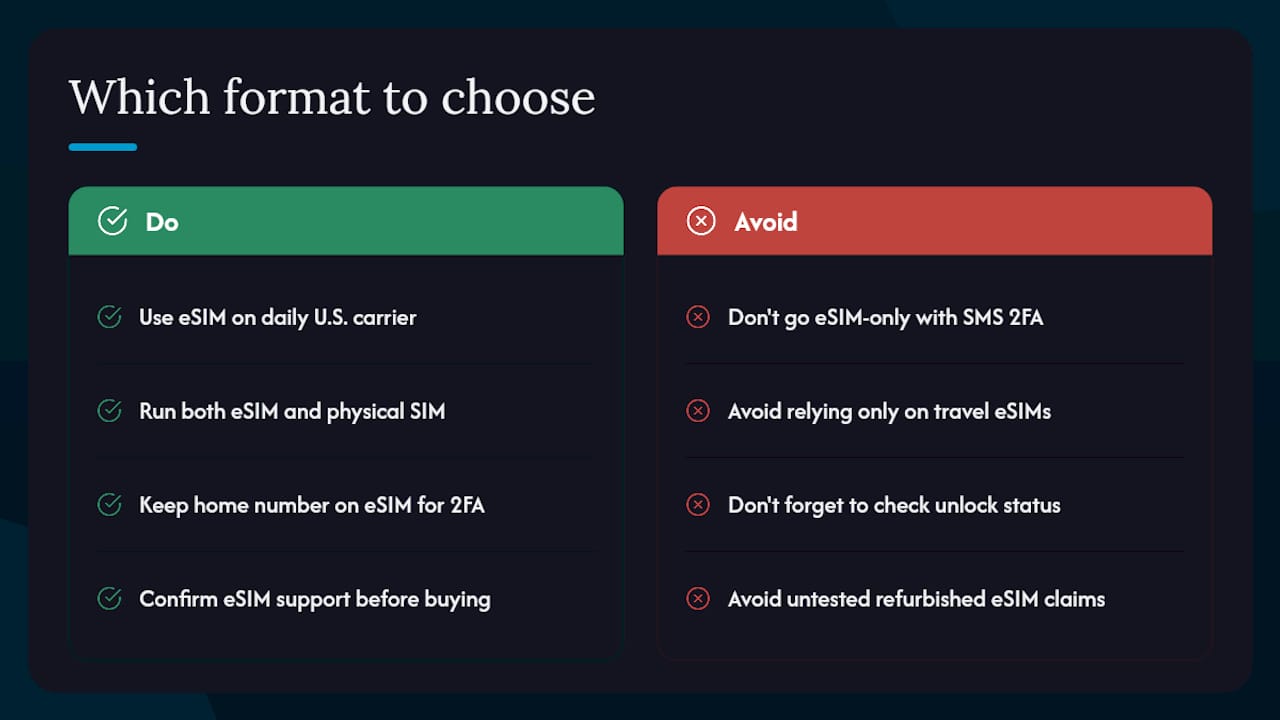
One subset of users should think twice before going fully eSIM-only: anyone who relies heavily on SMS-based 2FA for banking or work accounts. Travel eSIMs are often data-only and will not receive SMS. Keep a line that receives texts active, even if it is just a secondary eSIM profile.
Devicegiant’s refurbished phones go through a 25-point TrueGrade inspection and come with a 90-day return policy, so if you receive a device and the eSIM function does not work as described, you have a clear path to a return or exchange. Browse refurbished phones up to 70% off to find unlocked, eSIM-capable devices across a range of budgets.

What should you know about travel, dual-SIM, and activation problems?
Travel setup
The most reliable travel pattern is the “two-job” approach: your home eSIM handles calls, texts, and 2FA; a travel eSIM (data-only) handles browsing and maps. This keeps your home number reachable and your 2FA intact, which matters when your bank sends a verification code at the worst possible moment. Impressive Magazine’s 2026 travel guide documents this as the setup most frequent travelers land on after trial and error.
Dual-SIM setup
After adding a second line, go to SIM Card Manager (Android) or Cellular (iOS) and assign each line a role: one for calls and texts, one for data. Test both lines before you leave home. Make a call from each number, send a text, and confirm data switches correctly when you toggle the default. Catching a misconfigured line at home costs nothing; catching it at an airport costs time.
Common activation problems and fixes
“No Service” after eSIM download: toggle airplane mode, wait 60 seconds, toggle back. If that fails, restart the phone. Carrier provisioning sometimes needs a nudge.
QR code not scanning: ensure the screen displaying the QR code is at full brightness and held flat. If the camera still fails, enter the activation code manually. Most carriers provide both options.
eSIM option missing from Settings: the device may be carrier-locked, or the plan type may not support eSIM. Confirm unlock status and call carrier support to verify plan eligibility.
Pro Tip: Activate your eSIM on Wi-Fi before you need cellular service. Carrier profile downloads require a data connection, and if your current SIM is already deactivated, you will need Wi-Fi to complete the setup. Do this at home, not at the airport.
Why eSIM is the right call for most people buying phones today
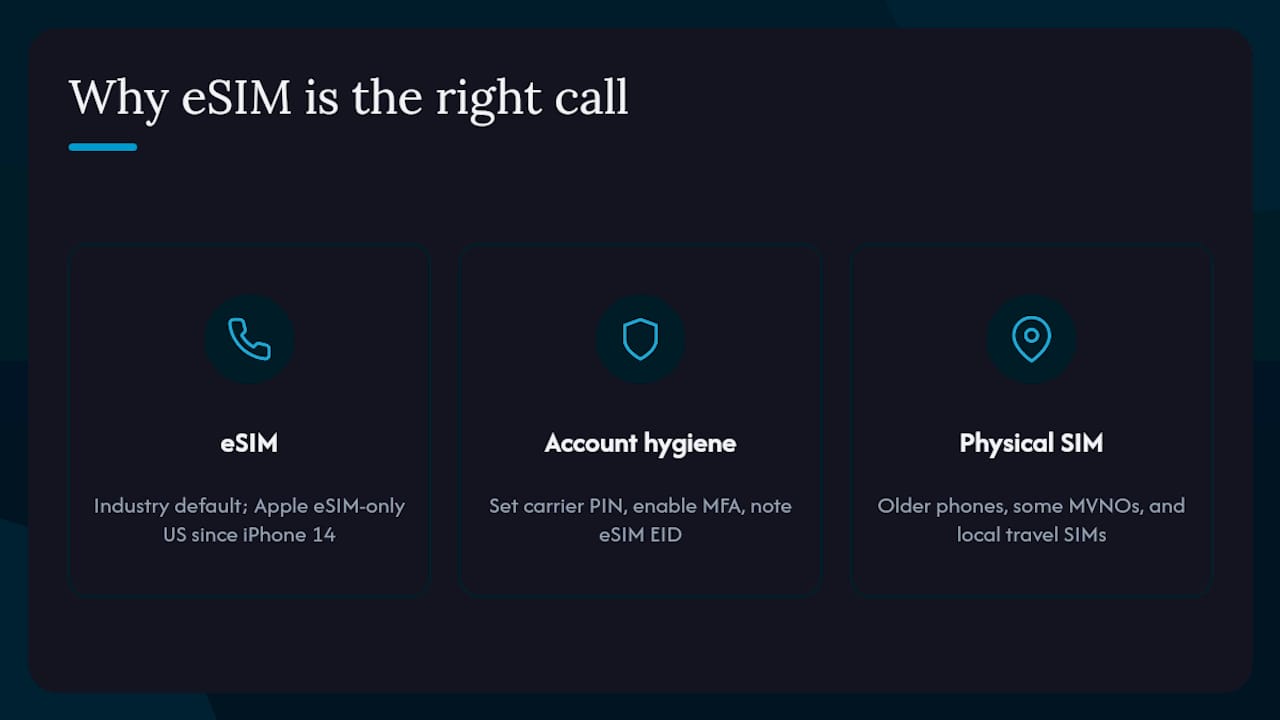
The conventional wisdom used to be “stick with physical SIM unless you have a reason to switch.” That framing is now backwards. eSIM is the industry default direction: Apple has shipped eSIM-only iPhones in the U.S. since the iPhone 14, and the trend toward removing the physical tray entirely is accelerating. Waiting for a reason to switch means you are already behind.
The real hesitation most people have is not technical. It is the fear of being locked out of a line during a device failure or a carrier dispute. That fear is legitimate, but it is solved by account hygiene, not by keeping a physical SIM. Set a carrier PIN, enable MFA on your account, and note your eSIM EID. Those three steps protect you far more than a plastic chip in a tray.
Physical SIM still has a place: older devices, certain MVNOs, and markets where local SIM kiosks are the fastest and cheapest option for travelers. But for anyone buying a phone in 2026, especially a refurbished unlocked device from a reputable seller, eSIM should be the starting assumption, not the exception.
Sources
- ESIM Vs Physical SIM: Full Comparison Guide (2026) | US Mobile
- Physical SIM Card vs. eSIM: What Sets Them Apart and Which Should You Choose? - CNET
- Set up cellular on iPhone with eSIM - Apple Support
- eSIM vs physical SIM: what actually changes in 2026 | cellt
- eSIM activation instructions | Verizon Support
- iPhone 17 eSIM-only countries list | MacRumors


