
Best Unlocked Refurbished Phones: Top Picks for 2026

For most buyers, a refurbished iPhone 15 (256GB) and a Pixel 9 Pro XL cover the best value-for-performance picks among the best unlocked refurbished phones on the market right now. Expect to pay significantly less than new pricing on either one, with the savings backed by real inspection standards rather than guesswork. Before you buy anything, two checks matter more than the rest combined: the IMEI status and the battery health percentage. A phone can look flawless and still be worthless if its IMEI comes back blacklisted.
Here’s the quick-scan version:
- Best overall: iPhone 15 (256GB), refurbished, for buyers who want years of software updates left
- Best Android: Pixel 9 Pro XL for camera quality; Pixel 8 as the budget floor
- Battery champion: Samsung Galaxy S22 Plus, known for strong post-refurbishment battery ratings
- Trust cue to look for: a seller that discloses cosmetic grading and runs a real functionality inspection, like Devicegiant’s TrueGrade 25-point check.
Key Takeaways
The best unlocked refurbished phones combine verified battery health, a clean IMEI, transparent cosmetic grading, and a return window of at least 90 days.
| Point | Details |
|---|---|
| Check the IMEI first | Run it through a GSMA or CTIA-backed checker before buying; a blacklisted IMEI blocks activation entirely. |
| Prioritize battery health | Aim for 85% or higher, or confirm a replacement guarantee, since battery failure is the most common issue. |
| Choose recent, supported models | Stick to devices 2 to 3 years old or newer with update support remaining, like the iPhone 15 or Pixel 9 Pro XL. |
| Demand real grading transparency | Insist on a disclosed A through D grade with photos and a list of any replaced parts. |
| Buy from verified refurbishers | Devicegiant backs every phone with a TrueGrade 25-point inspection, a 90-day return policy, and positive eBay feedback. |
Table of Contents
- Top Unlocked Refurbished Picks and Why They Made the List
- How to Choose an Unlocked Refurbished Phone: the Pre-Purchase Checklist
- In-Hand Testing: What to Run During the Return Window
- Why a Trusted Refurbisher Is the Real Safeguard
- Detailed Inspection Checklist for Physical Condition and Screen Quality
- Refurbishment Grades and Certifications, Explained
- How to Avoid Counterfeit and Clone Refurbished Phones
- Questions Worth Asking Before You Buy
- Price Comparison and What Actually Counts as Value
- What Matters More Than the Spec Sheet
- Shop Verified Unlocked Refurbished Phones at Devicegiant
- Sources
Top Unlocked Refurbished Picks and Why They Made the List
The right refurbished phone isn’t the one with the flashiest spec sheet. It’s the one that still has years of software support left and a battery that won’t die on you by next winter. That’s the filter every pick below had to survive.
-
iPhone 15, 256GB. This is the best overall pick for most shoppers because Apple typically supports iPhones for 5 to 7 years after release, so a refurbished 2023 model still has a long runway. Expect a refurbished price in the $297 to $450 range depending on condition grade, versus north of $800 new. Battery health on a well-graded unit should be good, ideally at a high percentage.
-
Pixel 9 Pro XL. Google’s flagship camera system holds up remarkably well two years out, and Pixel devices get multiple years of OS and security updates, among the longest windows in Android. If the price gap between a Pro XL and a base Pixel 9 feels steep, the Pixel 8 works as a genuine budget floor. It’s a full generation older but still inside its support window.
-
Samsung Galaxy S22 Plus. Samsung’s Galaxy line offers several years of security patches on flagship models. The S22 Plus specifically earns a spot here for battery durability. Refurbished units in this line, priced from around $146, consistently test well for battery retention compared to same-era competitors.
-
A reliable budget unlocked model. If your ceiling is under $200, look at unlocked mid-range Android devices like the Galaxy A-series. They won’t win camera shootouts, but they run current Android versions and get you a working, warrantied phone without financing anything.
Pro Tip: Before you fall for a bargain price, check how many years of updates the model has left. A phone that stops getting security patches next year is a worse deal than a slightly pricier one that’s covered through 2029.
A simple age rule cuts through most of the confusion: aim for devices that are 2 to 3 years old or newer, and check that the model still has update support remaining before you commit. Anything closer to its end-of-support date is a discount you’ll pay for later in security risk and app compatibility problems.
How to Choose an Unlocked Refurbished Phone: the Pre-Purchase Checklist
Before comparing a single price tag, run through what actually determines whether a refurbished phone is a smart buy or a slow-motion regret.
- IMEI and blacklist status. Every phone has a unique IMEI number, and you can check it against the GSMA-backed CTIA database before you buy. A negative IMEI status means the phone was reported lost, stolen, or has an unpaid balance, and it will not activate on a US carrier no matter how clean it looks.
- Unlocked status, verified. Factory-unlocked phones are safer than devices a third party unlocked with software, because factory-unlocked units don’t risk relocking themselves after a system update or factory reset.
- Battery health. Push for 85% or higher, or a seller-backed battery replacement guarantee if the listing doesn’t disclose a number.
- Warranty and return window. A 90-day return policy is the practical minimum worth accepting; 12 months is the safer target if you can find it.
- Grading transparency. Real photos, a disclosed A through D cosmetic grade, and documentation of any replaced parts (screen, battery, back glass) separate a trustworthy listing from a guess.
Certified refurbished programs from Apple and Samsung often bundle a new battery, new outer shell, and a full one-year warranty, which is why they command a price premium over third-party sellers. Third-party refurbishers can still be an excellent value if they publish the same information: grading criteria, battery percentage, and a real return policy.
In-Hand Testing: What to Run During the Return Window
The moment your phone arrives, you’re on the clock. Don’t wait until day 89 to find out the fingerprint sensor is dead.
First 15 minutes, non-negotiable checks:
- Confirm the IMEI printed on the box or in Settings matches the listing.
- Boot the phone and confirm it reaches setup without an Activation Lock or account lock screen.
- Insert a SIM and test a call and mobile data connection.
- Check the battery percentage in settings and note it for later comparison.
Next 60 minutes, deeper hardware tests: 5. Test both cameras, the speaker, and both microphones. 6. Run your finger across the entire screen checking for dead zones or discoloration. 7. Test every physical button, the charging port, and biometric unlock (Face ID or fingerprint). 8. Check Wi-Fi, Bluetooth, and GPS lock.
Pro Tip: Screenshot the battery health percentage and take a short video of every test on day one. If you need to file a return, timestamped evidence moves the process along a lot faster than a phone call describing the problem from memory.
Why a Trusted Refurbisher Is the Real Safeguard
A checklist only protects you if the seller lets you verify it. That’s the actual value a reputable refurbisher provides: someone already ran the checklist before it reached your doorstep.
Devicegiant’s TrueGrade process runs every device through a thorough functionality inspection and assigns a disclosed cosmetic grade from A to D, so the grade on the listing matches what shows up in the box.
Refurbishment and reuse are core to the circular economy in electronics. Every phone that gets a second life through resale is one less device adding to landfill waste.
There’s a business case for this beyond the planet, too: devices sold up to 70% below new pricing only work as a model if the inspection standard holds up. A refurbisher that cuts corners on grading doesn’t stay in business long on eBay’s feedback system.
Detailed Inspection Checklist for Physical Condition and Screen Quality
Cosmetic condition tells you almost as much as the spec sheet, if you know what to look for. Start with the screen under bright light, not dim room lighting, since scratches and micro-cracks hide easily in shadow. Tilt the phone at an angle to catch pressure marks or faint discoloration near the edges, a common sign of past water exposure.
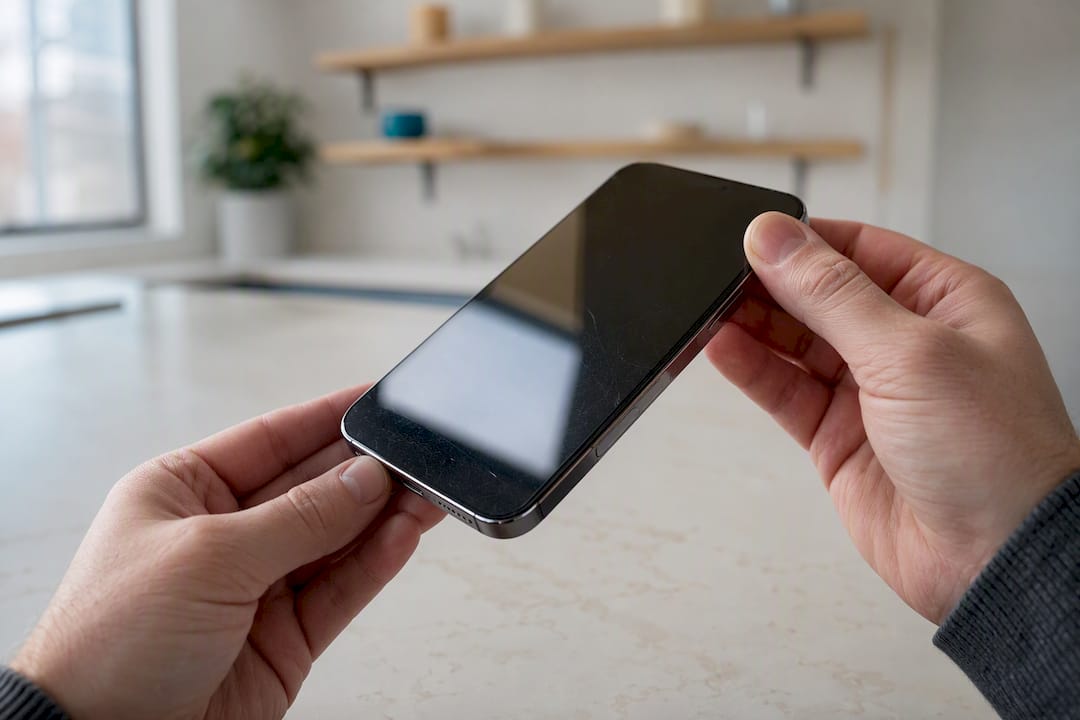
Check the frame and back glass for gaps, which can indicate a previous repair that wasn’t sealed properly. Press gently on the back panel; any flex or looseness suggests adhesive failure. Look at the charging port and headphone jack (if present) for corrosion or bent pins, both of which point to moisture damage that a visual grade alone might miss.
Finally, compare the listing photos against what you actually receive. A seller that photographs the specific unit, scratches and all, is more trustworthy than one using stock images. That’s exactly why cosmetic grading needs to be disclosed in writing, not just implied by price. A grade of “B” should mean something consistent across listings, and a reputable seller will define what that grade covers before you buy rather than after you complain.
Refurbishment Grades and Certifications, Explained
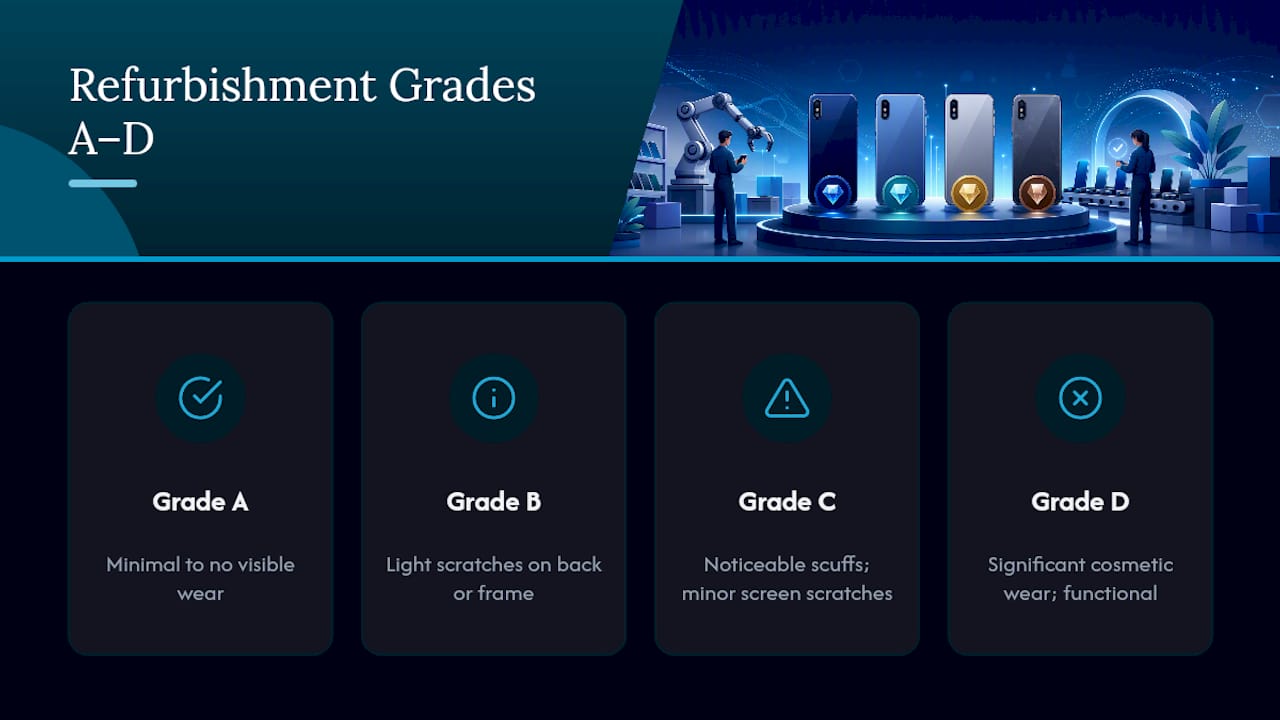
Grading systems vary by seller, but most fall into a recognizable A through D scale, and knowing what each tier actually means keeps you from overpaying for cosmetic condition you don’t need.
Grade A devices show minimal to no visible wear, essentially indistinguishable from new at arm’s length. Grade B phones have light scratches visible on close inspection, usually on the back or frame, with a screen that’s still clean. Grade C units carry more noticeable wear, visible scuffs, or minor screen scratches that don’t affect function. Grade D, sometimes labeled “fair” or “heavily used,” covers phones with significant cosmetic wear but full functionality.
None of these grades describe internal condition on their own, which is why the grading system matters less than what backs it up. A seller pairing cosmetic grades with an actual functionality inspection, confirming cameras, speakers, charging, and biometrics all work, is offering something meaningfully different from a seller that just eyeballs the screen and calls it “good condition.” Manufacturer-certified programs typically test to a stricter internal standard and pair it with a new battery, which is part of why they cost more than open-market refurbished units of the same model.
Devicegiant’s approach ties its A through D cosmetic scale directly to the 25-point TrueGrade functionality check, so the grade you see reflects both what the phone looks like and what it actually does.
How to Avoid Counterfeit and Clone Refurbished Phones
Clone phones exist, and they’re built to fool a fast glance. A counterfeit iPhone can run a modified Android skin dressed up to mimic iOS, complete with a fake Apple logo boot screen.
The fastest tell is the settings menu. On a genuine iPhone, go to Settings, General, About, and confirm the model number matches Apple’s official list for that device. On Android, dial *#06# to pull up the IMEI and cross-reference it with the number printed on the box and in the listing; a mismatch is an immediate red flag. Weigh the phone if you can. Counterfeits often use cheaper components and come in noticeably lighter or heavier than the genuine spec.
Check build quality details a clone manufacturer tends to skip: the precision of the camera cutout, the evenness of the bezel, and whether the charging port uses the correct connector type for that model and year. Buy from a seller who lists the exact IMEI or serial number pre-purchase when possible, and always verify that number through a carrier or manufacturer checker before your return window closes.
Questions Worth Asking Before You Buy
A few direct questions to a seller will tell you more than any amount of scrolling through photos.
Ask what the battery health percentage is at the time of listing, not “battery in good condition,” but an actual number. Ask whether the device is factory-unlocked or was unlocked through a third-party service, since that affects relocking risk down the line. Ask what specific parts, if any, were replaced during refurbishment, and whether replacement parts were genuine or aftermarket.
Ask about the return window in exact days, and whether return shipping is covered by the seller. Ask how the cosmetic grade was determined and whether it follows a published standard you can review before buying. Finally, ask if the IMEI is available to check prior to purchase. A seller with nothing to hide will answer all six without hesitation.
Price Comparison and What Actually Counts as Value
The lowest price on a refurbished phone search is rarely the best deal once you account for battery health, warranty length, and how many years of software support remain.
A refurbished flagship typically runs 40 to 50% below its original launch price, while still delivering 80 to 90% of a new device’s performance in daily use. That gap between price drop and performance drop is where the real value sits. A phone selling for $50 less than a comparable listing but with no disclosed battery health or a 14-day return window isn’t cheaper; it’s riskier.
Timing also affects price more than most buyers realize. Refurbished inventory tends to deepen and prices tend to soften around new flagship launches, as trade-ins flood the secondary market. If you can wait a month or two after a major release, you’ll often find better condition units at lower prices than buying right after the previous model drops out of headlines.
If you’re pairing a refurbished purchase with a broader budgeting plan, tools like the ones compared on iOS budgeting apps can help track whether that upfront saving actually holds up against a financed new phone over two years.
What Matters More Than the Spec Sheet
Most buying guides fixate on camera megapixels and processor benchmarks, and that’s the wrong obsession for a refurbished purchase. The phone that fails you in eight months because of a swollen battery or a blocked IMEI was never a bargain, regardless of how good its camera looked in the listing photos.
The conventional advice tells shoppers to chase the best deal on the newest possible model. The better approach flips the priority order: verify the seller’s transparency first, confirm battery health and IMEI status second, and treat the model name as the last decision, not the first. A three-year-old flagship from a seller who discloses grading and battery percentage beats a brand-new-looking phone from a seller who won’t answer basic questions.
If you take one thing from this guide, make it this: a 90-day return window is not a courtesy, it’s the only real insurance you have against a refurbisher’s mistake. Anything shorter shifts risk squarely onto you. Buy from sellers who treat that window, and the inspection standard behind it, as the actual product.
— Saad
Shop Verified Unlocked Refurbished Phones at Devicegiant
Devicegiant runs every phone through the same TrueGrade 25-point inspection covered throughout this guide, so the grading and battery disclosures you just learned to demand are already built into the listing before you ever click buy.

That means you’re not relying on a stranger’s word about battery health or cosmetic condition. Whether you’re after an iPhone 15 starting around $297, a battery-strong Galaxy S22 Plus from $146, or a budget-friendly unlocked Android under $200, the full refurbished lineup is sorted by grade and price so you can compare real options instead of guessing. Browse the current inventory and check battery health and grading on any listing before your next upgrade.
Sources
- Should you buy a refurbished phone? — Consumer Reports
- GSMA Device Check powers CTIA stolen device checker service — GSMA newsroom
- Guide To Buying Refurbished Phones 2026 Edition — KnowYourMobile


