
Cautious Buyers: Safe Refurbished Phones with 25 Point Inspection

Yes, refurbished phones are safe when you buy from a certified or professionally audited refurbisher and the specific model still receives security updates. The real risks aren’t the device itself but three things you can check before checkout: whether the OS is still supported, whether the seller documents its testing and grading, and whether you personally factory reset and update the phone the day it arrives. A phone with a real warranty and a clear grading system is a safe buy; a $60 no-name listing with no return policy is a gamble.
TL;DR:
- Buying from a certified or audited refurbisher with a documented testing process and a warranty significantly reduces safety risks.
- Over 33% of resold phones in a 2020 study were unsupported by security updates, leaving known vulnerabilities unpatched.
- Running a factory reset, updating the OS, and verifying IMEI status upon arrival are essential steps to ensure software safety and device legitimacy.
- Certified refurbishers follow established standards like R2 or ISO, providing a clearer indication of quality and environmentally responsible handling.
- A 90-day or longer warranty and transparent grading details are strong signals of a trustworthy refurbished phone.
Table of Contents
- Is It Safe to Buy a Refurbished Phone? What “Refurbished” Actually Means
- The Real Safety Risks: Software, Malware, Parts, and Locks
- How to Spot a Refurbisher You Can Actually Trust
- Your Pre-Purchase Checklist Before You Click Buy
- Setting Up Your Refurbished Phone Safely on Day One
- Why Device Giant Meets This Safety Bar
- The Short Answer, One More Time
- Don’t Skip This: Factory Reset and Update Before First Use
- Quality Standards That Separate Real Refurbishers From Resellers
- New vs. Refurbished vs. Used: Which Is Actually Safer?
- What the Data Actually Tells Cautious Buyers
- Get a Safety-Checked Refurbished Phone From Devicegiant
- Sources
Is It Safe to Buy a Refurbished Phone? What “Refurbished” Actually Means
Not all refurbished phones go through the same process, and that gap is exactly where risk hides. “Refurbished” gets used loosely across four very different sales channels, and each carries a different safety profile.
- Manufacturer-certified programs (Apple Certified Refurbished, Samsung Certified Re-Newed) run devices through factory diagnostics, replace batteries below a threshold, and back the phone with a warranty comparable to a new device.
- Professional third-party refurbishers run their own documented inspection process, often 20 to 30 checkpoints covering cameras, buttons, ports, battery, and screen.
- Marketplace “renewed” listings (a label some big retailers apply) vary in quality because the underlying refurbisher differs from seller to seller.
- Individual or unverified sellers may just wipe a phone and resell it with no testing, no grading, and no warranty at all.
The grading tier attached to a listing (often labeled like new, good, or acceptable) tells you how much cosmetic wear to expect, but a legitimate refurbisher pairs that grade with functional testing, not just a glance at the screen. That distinction is what separates a phone worth buying from one that looks fine in photos but has an undocumented history.
The Real Safety Risks: Software, Malware, Parts, and Locks
The biggest threat to a refurbished phone isn’t hardware. It’s software that stopped getting patched years ago. A 2020 study on pre-owned devices found nearly a third of resold models were no longer receiving manufacturer security updates, leaving known vulnerabilities wide open on phones that otherwise looked perfectly functional.
By the numbers: Nearly 33% of resold phone models in that study were unsupported and exposed to publicly known security flaws, a gap invisible to anyone judging a phone by its screen condition.
Software isn’t the only risk category worth understanding:
- Residual data from a lazy wipe. Avast’s research on phones sold at pawn shops recovered personal data from devices that had already gone through a standard factory reset, which is why professional sanitization matters more than a quick settings reset.
- Non-genuine parts. A screen or battery swapped with an off-brand part can affect touch accuracy, color calibration, or charging safety, and it’s the kind of thing a rushed refurbisher skips disclosing.
- Carrier locks and blacklisted IMEIs. A phone can power on perfectly and still be useless on a network if it’s reported lost, stolen, or tied to an unpaid balance.
Each of these translates into a concrete harm: a data breach from recovered files, a phone that dies faster than it should, or a device you can’t activate at all. One industry analysis on refurbished phones and malware risk makes the point plainly: when buyers stick to certified refurbishers and run a proper reset and update on arrival, the malware risk lands close to what you’d face buying new. The process is what determines the outcome, not the fact that the phone changed hands once already.
How to Spot a Refurbisher You Can Actually Trust
Here’s the shortlist that separates a documented refurbisher from a reseller hoping you don’t ask questions.
- Check whether they’re certified or independently audited. Consumer Reports recommends prioritizing manufacturer-certified programs or refurbishers who document their testing process, since transparency about parts and testing is the easiest proxy for safety when you can’t inspect the phone in person.
- Read the warranty terms closely. A legitimate refurbisher backs its phones for at least 90 days, and certified programs often extend a full year, similar to buying new.
- Ask about battery policy. A seller who guarantees a minimum battery capacity or discloses a replacement policy is telling you they actually checked.
- Look for R2 or ISO-aligned processing standards. These certifications signal the refurbisher follows recognized environmental and quality handling protocols rather than an ad hoc process.
- Check the review history. Thousands of reviews with a consistently high satisfaction rate say more than a polished product photo ever will.
Walk away from listings with vague descriptions like “fully tested” with no explanation of what that means, and be suspicious of prices that sit far below every other listing for the same model, condition, and storage size.
Pro Tip: Ask a seller directly what parts were replaced and what the diagnostic report covers. A refurbisher with nothing to hide will answer in one email; one that dodges the question is telling you something.
Your Pre-Purchase Checklist Before You Click Buy
Run through this before any refurbished phone purchase, regardless of where you’re buying it.
- Confirm the OS support window. Search the model name plus “security update support” to see how many years of patches remain, since that single detail determines long-term safety more than anything else.
- Ask for the diagnostic report. Battery health percentage, replaced parts, and test results should be available on request, not hidden.
- Run an IMEI check. A free IMEI check reveals blacklist status, lost or stolen reports, and any unpaid carrier balance tied to the device before you commit.
- Verify warranty length and return window. Anything under 30 days is thin protection; 90 days gives you room to actually use the phone before deciding.
- Request a powered-on photo or short video. A seller who refuses this basic verification is a seller worth skipping entirely.
None of these steps take more than a few minutes, and together they eliminate almost every horror story you’ll read about refurbished phones gone wrong.
Setting Up Your Refurbished Phone Safely on Day One
The phone arrives. Before you sign in to anything, run this sequence.
- Factory reset it yourself, even if the seller claims they already did one. Doing this yourself guarantees a clean state and clears lingering accounts, profiles, or hidden apps that a previous reset might have missed.
- Install every pending OS and app update before signing into any personal account. This closes the exact vulnerability gap that made unsupported resold phones risky in the first place.
- Set a strong lock screen and enable biometrics. Pair this with app-based multifactor authentication instead of SMS codes wherever your accounts allow it.
- Audit app permissions and disable unknown-install sources on Android before adding any third-party apps.
- Skip public Wi-Fi during initial setup. Do the whole process on a trusted network, especially while you’re signing into email or banking apps for the first time.
Once the phone is running, keep an eye on battery drain and data usage for the first week. A sudden spike in either is an early sign something installed itself without your knowledge. A reputable Android security app can add a layer of monitoring, and if anything looks off after that, it’s worth a visit to a repair professional rather than guessing.
Pro Tip: Write down the IMEI and serial number somewhere outside the phone itself before you do anything else. If the device is ever lost or stolen, you’ll need it fast, and digging through settings won’t help you at that point.
Why Device Giant Meets This Safety Bar
Every trust signal covered above maps directly to how Devicegiant operates. Its TrueGrade process runs every phone through a documented 25-point inspection, covering functionality, battery health, and cosmetic condition, with the grade disclosed upfront rather than buried in fine print.
- A 90-day return policy gives you real room to test the phone before committing, well past the 30-day minimum that should raise a flag elsewhere.
- 99.8% positive feedback across its eBay history reflects a track record built on thousands of transactions, not a handful of curated reviews.
- Battery condition is checked and disclosed rather than left to guesswork, directly addressing the battery health question that trips up so many refurbished buyers.
That combination of documented testing, a real return window, and transparent grading is exactly what separates a refurbisher worth trusting from a reseller hoping you won’t ask questions.
The Short Answer, One More Time
Refurbished phones are safe under three conditions: the seller documents its testing, the model still receives security updates, and you personally reset and update the device before using it. Skip any one of those and you’re gambling.
- Buy from a certified or professionally audited refurbisher, never an unverified individual listing.
- Verify the OS support window and run an IMEI check before paying.
- Factory reset and update the phone yourself the moment it arrives.
Devicegiant’s refurbished phone lineup checks each of these boxes with documented grading and a 90-day return window built in.
Don’t Skip This: Factory Reset and Update Before First Use
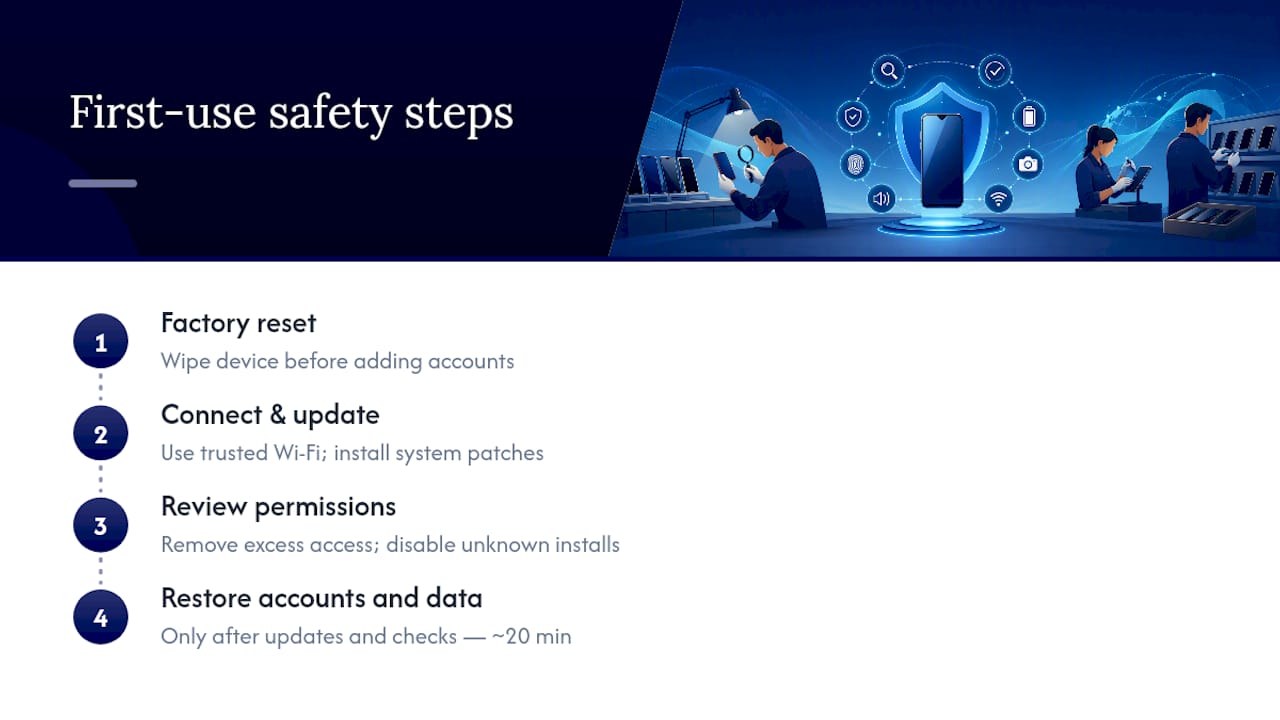
Even when a refurbisher claims they wiped a phone before shipping, treat that as a starting point, not a guarantee. Go into settings and run a full factory reset yourself before adding a single account. This single step erases any leftover configuration profiles, cached logins, or forgotten apps a previous owner or a rushed refurbishing process left behind.
Once the reset finishes, connect to a trusted Wi-Fi network and check for system updates immediately, before you sign into email, banking, or social apps. Phones that shipped months ago in inventory often carry several patches worth of updates waiting. Installing them closes the exact security gaps that made older resold devices a target for known exploits.
After updates finish, review the default app permissions. Refurbished Android phones sometimes ship with manufacturer bloatware that requests more access than it needs. Strip permissions you don’t recognize, disable installation from unknown sources unless you specifically need it, and only then start restoring your own accounts and data. This sequence, reset first, update second, permissions third, takes maybe 20 minutes and eliminates most of the software-based risk tied to buying secondhand.
Quality Standards That Separate Real Refurbishers From Resellers
The refurbished phone market has no single government-mandated grading system, which is exactly why buyers need to know what legitimate standards look like. The clearest signal is R2 (Responsible Recycling) certification or ISO 9001/14001 alignment, both of which require documented processes for testing, data destruction, and environmentally responsible handling of components that don’t pass inspection.
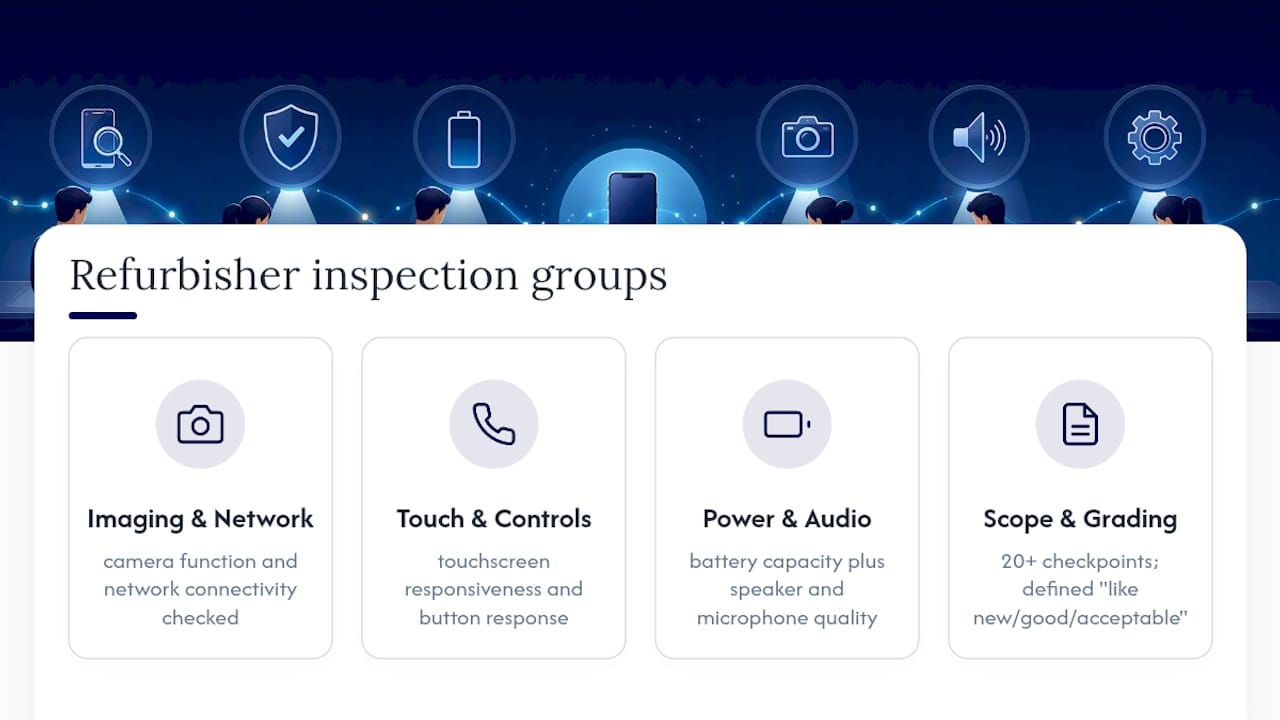
Beyond formal certification, look for a refurbisher that publishes its own testing checklist rather than a one-line “tested and working” claim. A real inspection process checks touchscreen responsiveness, camera function, charging port integrity, button response, speaker and microphone quality, battery capacity, and network connectivity, typically 20 or more individual checkpoints. Grading language should be specific too: “like new,” “good,” and “acceptable” need clear cosmetic definitions attached, not just a subjective label.
Certified manufacturer programs remain the gold standard because Apple and Samsung control their own parts supply chains, meaning replacement components are guaranteed genuine. Third-party refurbishers can match that bar, but only when they’re transparent about where replacement parts come from. If a refurbisher won’t answer a direct question about part sourcing, that silence is itself useful information.
New vs. Refurbished vs. Used: Which Is Actually Safer?
Buying new eliminates history-related risk entirely. There’s no prior owner, no wear, no question about what happened to the battery. But “new” doesn’t mean risk-free forever, since every phone eventually ages out of its update window regardless of who owned it first.
A used phone sold peer-to-peer carries the highest uncertainty. No inspection, no warranty, no grading, and no guarantee the seller even wiped it properly, which is precisely the scenario that produced Avast’s recovered-data findings from resold devices.
A refurbished phone from a certified or documented seller sits closer to new than most people assume. The battery is checked or replaced, the parts are verified, the software is confirmed to run current updates, and a warranty backs the purchase. The gap between new and properly refurbished is mostly cosmetic wear, not safety.
The real risk gradient runs: certified refurbished and new are close together at the safe end, professionally refurbished from a documented third party sits just behind them, and unverified used or peer-to-peer sales trail well behind due to the total absence of testing, grading, or recourse if something goes wrong.
What the Data Actually Tells Cautious Buyers
Most advice on refurbished phones treats “new vs. used” as the real question. It isn’t. The data points somewhere more specific: the seller’s process is the variable that determines safety, not the fact that a phone had a previous owner.
The conventional wisdom oversells caution without giving buyers a way to act on it. Telling someone to “be careful” about refurbished phones isn’t guidance, it’s just anxiety with no exit. What actually moves the needle is boring and specific: check the update window, check the warranty, check the IMEI, reset it yourself. Skip the vague warnings and go straight to the checklist.
If cautious buyers prioritize one thing first, it’s this: confirm the phone is still inside its manufacturer’s security update window before anything else. A phone with perfect cosmetic grading and no update support is a worse buy than a lightly worn one that’s still patched monthly. Everything else, battery health, warranty length, return policy, matters too, but none of it compensates for software that’s already stopped receiving fixes.
— Saad
Get a Safety-Checked Refurbished Phone From Devicegiant
You now know exactly what separates a safe refurbished phone from a risky one: documented testing, honest grading, real warranty backing, and update support. Devicegiant builds its entire process around those exact checkpoints instead of leaving you to guess. Every device goes through the TrueGrade 25-point inspection before it ships, with cosmetic grading disclosed upfront and battery condition checked rather than assumed.

That means you’re not choosing between “cheap” and “safe.” A Samsung Galaxy S22 Ultra 5G or a Google Pixel 4 XL from Devicegiant comes backed by a 90-day return window and a track record of 99.8% positive feedback across thousands of eBay transactions. If you’re ready to apply everything in this guide, browse Devicegiant’s refurbished phone lineup and check the grading and battery details listed on any model before you buy.
Sources
- Are pre-owned smartphones safe? How to choose a second-hand phone and avoid security risks
- Avast finds personal data on phones sold at pawn shops
- Should You Buy a Refurbished Phone?
- How to secure a used or refurbished device (practical guide)
- Free IMEI check for refurbished phones


